P&L stands for profit and loss. A P&L statement, also called an income statement, shows a business's revenue, costs and expenses over a specific period and whether it made a profit or a loss. You may also see P&L written as PnL or PNL.
For ecommerce brands, a P&L helps answer a more useful question than "How much did we sell?": How much did we actually keep after the costs of generating those sales?
An ecommerce P&L can include revenue, discounts, refunds, cost of goods sold (COGS), shipping, fulfilment, payment fees, ad spend and operating expenses.
The basic idea is simple:
Revenue - Expenses = Profit or Loss
A store can generate strong revenue, growing order volume and an impressive ROAS while still producing weak profit. This guide explains what P&L means, how to read a profit and loss statement, what each line means for ecommerce and how to use P&L data to make better decisions.
What is a P&L statement?
A P&L statement is a financial report that summarises the revenue, costs and expenses of a business over a specific period, such as a month, quarter or year.
If revenue is greater than expenses, the business records a profit. If expenses are greater than revenue, it records a loss.
A P&L is also commonly called an income statement. It is one of the three main financial statements used to understand a business, alongside the balance sheet and cash flow statement.
At its simplest:
Revenue - Expenses = Profit or Loss
For ecommerce businesses, the calculation becomes more useful when all the costs behind a sale are included. That can mean COGS, discounts, refunds, advertising, shipping, fulfilment, payment processing fees and other operating expenses.
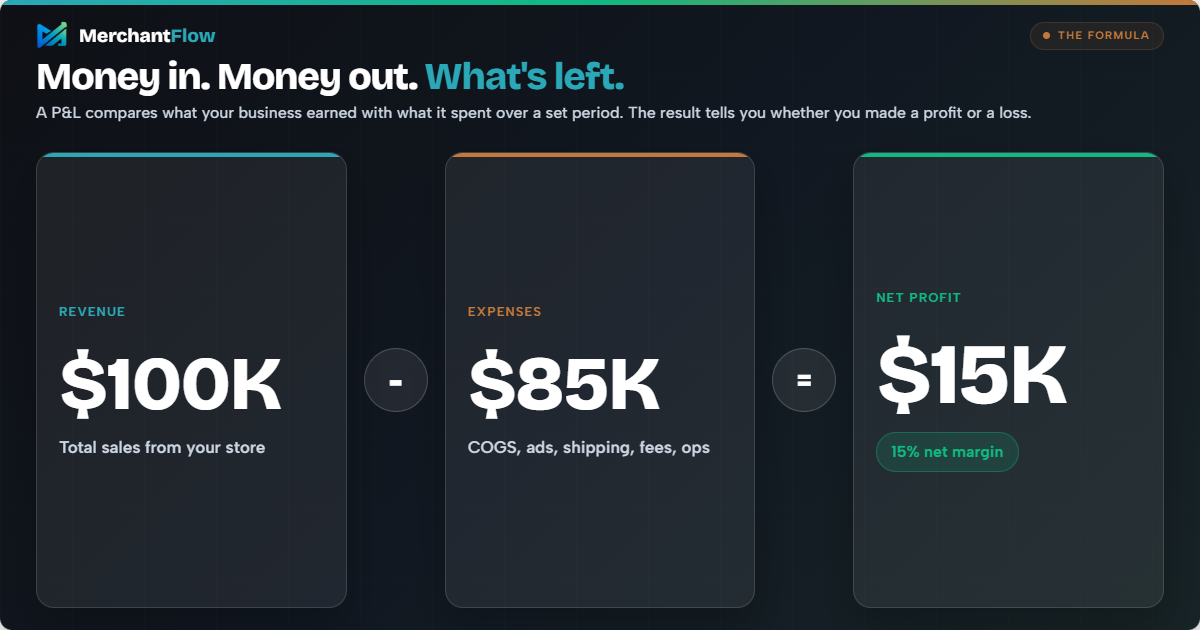
That is why P&L is not just an accounting term. It is a practical way to understand business health.
Is P&L the same as an income statement?
Yes. A P&L statement and an income statement are the same type of financial report. Both show a business's revenue, costs and expenses over a specific period and the resulting profit or loss.
"Profit and loss statement" or "P&L" is common terminology among business owners, while "income statement" is often used in formal accounting and financial reporting. You may also see terms such as "statement of profit and loss" or "statement of operations".
P&L vs balance sheet vs cash flow statement
| Financial statement | What it tells you | Time view |
|---|---|---|
| P&L / income statement | Whether revenue exceeded expenses and the business made a profit or loss | A period, such as a month, quarter or year |
| Balance sheet | What the business owns, owes and has in equity | A specific point in time |
| Cash flow statement | How cash moved into and out of the business | A period of time |
These reports answer different questions. A business can show a profit on its P&L while still experiencing cash flow pressure because the timing of inventory purchases, supplier payments, customer payouts and other cash movements can differ from when revenue and expenses are recognised.
What does a P&L statement include for ecommerce?
In ecommerce, P&L is about more than a financial report.
It is a way to understand how profitable your store, products, channels and campaigns really are.
A standard P&L looks at revenue, cost of goods sold, gross profit, operating expenses and net profit. Shopify explains that gross profit is calculated by subtracting cost of goods sold from revenue, while net income represents the amount gained or lost during a reporting period after costs and expenses are accounted for.
For ecommerce businesses, the numbers usually include:
| P&L item | What it means for ecommerce |
|---|---|
| Gross sales | Sales before discounts and refunds |
| Discounts | Promo codes, automatic discounts and offers |
| Refunds | Revenue returned to customers |
| Net revenue | Revenue remaining after discounts and refunds |
| Cost of goods sold | Direct cost of the products sold, including relevant landed product costs |
| Gross profit | Net revenue left after COGS |
| Ad spend | Google Ads, Meta Ads, TikTok Ads, Snapchat Ads and other paid channels |
| Shipping and fulfilment | Delivery, 3PL, pick and pack and related order costs |
| Payment fees | Shopify Payments, PayPal, Stripe, Afterpay and other transaction fees |
| Operating expenses | Software, wages, contractors, admin and other costs of running the business |
| Net profit | What remains after all expenses are included |
Exactly where individual costs appear can vary depending on a business's accounting approach. The important thing is to use a consistent treatment from period to period so changes in margin reflect changes in the business rather than changes in how costs are categorised.
This is where ecommerce P&L becomes useful.
It gives you a clearer view of what is really happening behind your sales numbers.
Why P&L matters for ecommerce growth
Revenue tells you how much your store sold.
P&L tells you whether those sales were worth it.
That difference matters because ecommerce brands often scale based on surface-level metrics. A founder might see rising revenue and assume the business is growing in the right direction. A marketer might see a strong return on ad spend and assume the campaign is profitable. A product might be a bestseller and still have poor margins.
Without a clear P&L, it is easy to confuse activity with progress.
A P&L can help ecommerce brands:
| Business question | How P&L helps |
|---|---|
| Are we profitable? | Shows whether the business made or lost money after costs |
| Are our products priced correctly? | Highlights whether gross margins are strong enough |
| Is ad spend helping or hurting? | Shows how much profit remains after paid acquisition costs |
| Which costs are increasing? | Makes rising shipping, fulfilment, product or software costs easier to spot |
| Can we afford to scale? | Shows whether growth is improving or reducing net profit |
| Which products should we push? | Helps identify products with strong contribution margin |
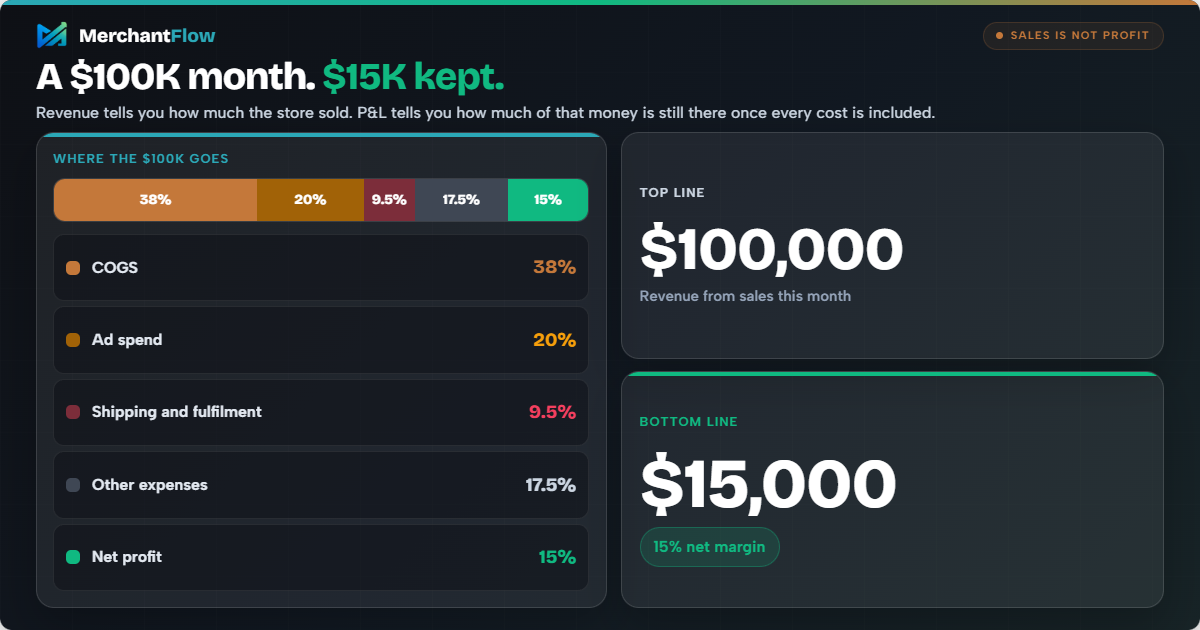
A profit and loss statement can also support decisions around pricing, sales targets and cost management. P&L statements are commonly prepared monthly, quarterly or annually, but ecommerce brands may benefit from monitoring profit more frequently when advertising spend, product costs or margins change quickly.
For ecommerce brands, that pricing point is important.
A product may look successful because it sells often. But if its landed cost is too high, shipping is expensive or ads are required to move it, the product may not be as profitable as it seems.
How to read a P&L report
A P&L report is easier to understand when you break it into sections.
Most P&L reports move from revenue at the top to net profit at the bottom. This is why revenue is often called the top line and net profit is often called the bottom line.
Here are the main parts to understand.
1. Revenue
Revenue is the total amount of money your business earns from sales before expenses are deducted.
For an ecommerce store, revenue usually comes from product sales. It may also include subscriptions, upsells, bundles, gift cards or other income depending on how the store is set up.
Example:
| Month | Revenue |
|---|---|
| January | $42,000 |
| February | $51,000 |
| March | $63,000 |
In this example, revenue is increasing each month.
That looks positive, but revenue alone does not show whether profit is increasing too.
2. Cost of goods sold
Cost of goods sold, often called COGS, is the direct cost of the products you sold.
For ecommerce, COGS may include:
Product manufacturing cost
Wholesale purchase cost
Landed cost
Packaging directly tied to the product
Inventory costs, depending on your accounting method
A simple formula is:
Beginning Inventory + Purchases - Ending Inventory = Cost of Goods Sold
COGS matters because it directly affects gross profit.
If your product costs increase but your selling price stays the same, your margin gets smaller.
3. Gross profit
Gross profit is what remains after deducting COGS from revenue.
Net Revenue - COGS = Gross Profit
Example:
| Item | Amount |
|---|---|
| Revenue | $100,000 |
| COGS | $40,000 |
| Gross profit | $60,000 |
In this example, the gross profit is $60,000.
That means the business has $60,000 left before deducting other expenses such as ad spend, shipping, software, wages and fees.
Gross profit is useful because it shows how much room you have to cover the rest of your business costs.
4. Operating expenses
Operating expenses are the costs required to run the business.
For ecommerce, this can include:
- Ad spend
- Shipping and fulfilment
- Payment processing fees
- Subscriptions and apps
- Wages and contractors
- Rent or warehouse costs
- Professional services
- Admin costs
Shopify notes that operating expenses include the costs needed for day-to-day business functions, such as payroll, administrative expenses, marketing, rent and repairs.
This is one of the areas where ecommerce brands can underestimate costs.
A few apps, fulfilment fees, returns, agency fees and paid ads can quickly eat into profit.
5. Operating profit
Operating profit is the amount left after deducting operating expenses from gross profit.
Gross Profit - Operating Expenses = Operating Profit
This shows whether the core business is profitable before other non-operating items, such as interest or tax.
For ecommerce brands, operating profit is useful because it shows whether the store can make money from its normal operations.
6. Net profit
Net profit is the final amount left after all expenses are deducted.
This is the number that shows whether the business actually made money.
Revenue - All Expenses = Net Profit
Net profit is often the most important figure in a P&L because it reflects the overall result of the business.
A store might generate $100,000 in sales, but if total costs are $96,000, the net profit is only $4,000.
That is the difference between looking busy and being profitable.
Ecommerce P&L example
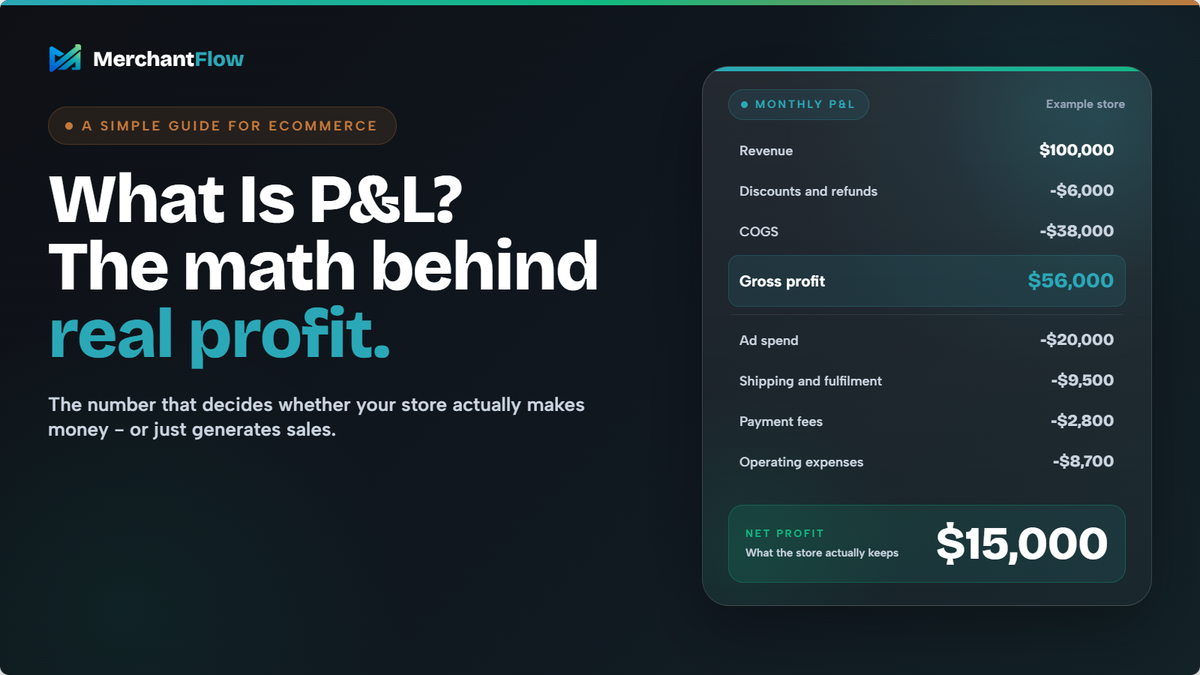
Here is a simple ecommerce P&L example.
| Line item | Amount |
|---|---|
| Gross Sales | $100,000 |
| Discounts and refunds | -$6,000 |
| Net revenue | $94,000 |
| COGS | -$38,000 |
| Gross profit | $56,000 |
| Ad spend | -$20,000 |
| Shipping and fulfilment | -$9,500 |
| Payment fees | -$2,800 |
| Software and subscriptions | -$2,200 |
| Other operating expenses | -$6,500 |
| Net profit | $15,000 |
At first glance, this store generated $100,000 in gross sales.
After $6,000 in discounts and refunds, net revenue was $94,000. After COGS, ad spend, shipping and fulfilment, payment fees, software and other operating expenses, the business kept $15,000 in net profit.
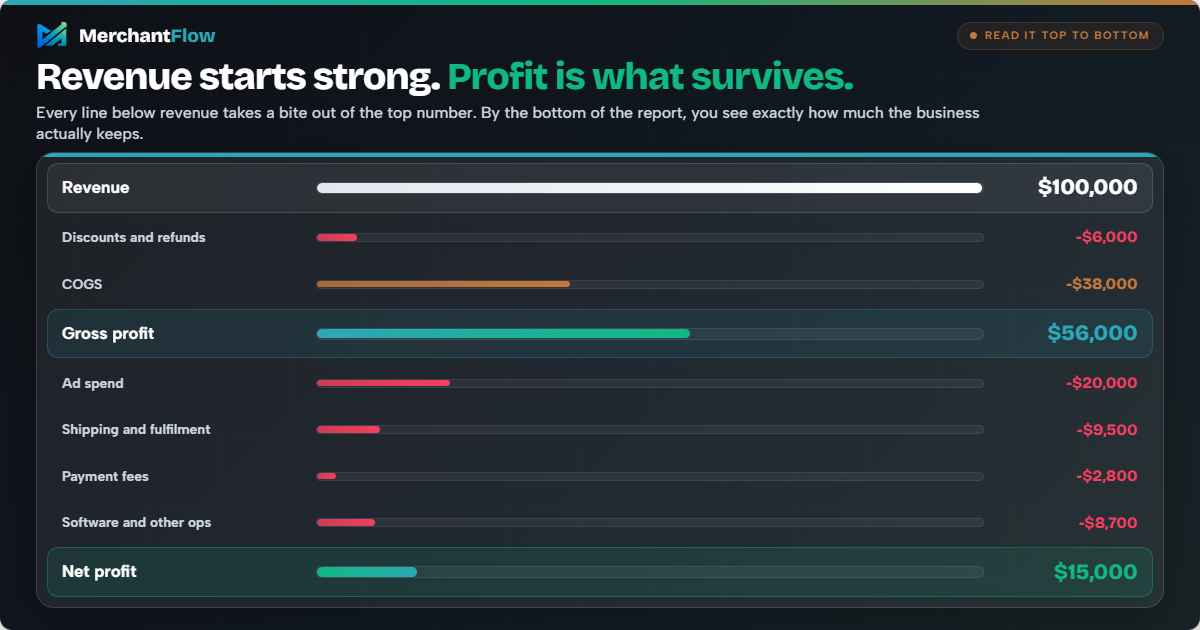
Using net revenue, its net profit margin is:
$15,000 ÷ $94,000 × 100 = 15.96%
Rounded, the store has a 16% net profit margin.
This is why P&L matters. The $100,000 sales figure tells you how much the store sold. The P&L shows how much it actually kept.
How to create an ecommerce P&L
To create an ecommerce P&L, start with sales for the reporting period, subtract discounts and refunds to find net revenue, subtract COGS to calculate gross profit, then account for the remaining costs of running and marketing the store.
For ecommerce, that usually means making sure ad spend, shipping, fulfilment, payment fees and other operating expenses are included before calculating net profit.
If you want to build one using your own numbers, use MerchantFlow's free Ecommerce P&L Template & Builder. It lets you enter your revenue and costs across six months and automatically calculates gross margin, EBITDA and net profit.
What affects ecommerce profit and loss?
Ecommerce profit changes whenever revenue, product costs or operating expenses change.
Some of the biggest P&L drivers for online stores are changes in demand, COGS, paid advertising costs, shipping and fulfilment, refunds and returns, supplier pricing, currency movements and expenses that have not been tracked correctly.
1. Changes in demand
If demand drops, revenue usually drops too.
This can happen because of seasonality, competition, product fatigue, economic conditions or changes in customer behaviour.
For ecommerce brands, demand can also change quickly based on platform trends, paid ad performance or shifts in search demand.
2. Rising product costs
If suppliers increase prices, your COGS rises.
That reduces gross profit unless you increase prices, reduce costs elsewhere or improve your product mix.
This is especially important for brands importing products, managing multiple suppliers or selling low-margin items.
3. Higher ad spend
Paid acquisition is one of the biggest profit levers in ecommerce.
If ad costs rise but conversion rate, average order value or margin does not improve, net profit can fall even while revenue grows.
This is why return on ad spend can be misleading on its own. A strong return on ad spend does not automatically mean the business is profitable after COGS, shipping, refunds and operating costs.
4. Shipping and fulfilment costs
Shipping and fulfilment costs can quietly reduce margin.
Free shipping, split shipments, 3PL pick and pack fees, packaging costs and returns handling can all affect profitability.
A product that looks profitable before fulfilment may be far less attractive once fulfilment costs are included.
5. Refunds and returns
Refunds reduce revenue.
Returns can also create extra costs through reverse logistics, damaged inventory, customer support and replacement shipping.
For some ecommerce categories, returns can significantly change product-level profitability.
6. Currency and supplier changes
If you buy inventory in one currency and sell in another, exchange rate changes can affect product costs.
This is especially relevant for stores importing goods or working with overseas suppliers.
7. Untracked expenses
One of the biggest P&L risks is not tracking all expenses properly.
If your P&L excludes certain costs, it may show a profit that is not really there.
Common missing costs include:
- Payment fees
- Packaging
- App subscriptions
- Agency fees
- Freight costs
- Return costs
- Influencer payments
- Ad platform spend that is not attributed correctly
A P&L is only as useful as the data behind it.
How to analyse your P&L
A P&L is not just something to file away at the end of the month.
Used properly, it can help you make better decisions.
Here is a practical way to analyse it.
1. Compare revenue and net profit
Start by looking at whether revenue and profit are moving in the same direction.
If revenue is increasing but net profit is flat or falling, something is eating into margin.
That could be ad spend, discounts, shipping, product costs or operating expenses.
2. Review gross margin
Gross margin shows how much money is left after product costs.
Formula:
Gross Profit ÷ Net Revenue × 100 = Gross Margin
Using the ecommerce P&L example above:
$56,000 ÷ $94,000 × 100 = 59.6% gross margin
That means approximately 59.6 cents of every dollar of net revenue remains after COGS, before the remaining operating costs are deducted.
A falling gross margin may mean product costs are increasing, discounts are too aggressive or lower-margin products are making up more of your sales.
3. Review net profit margin
Net profit margin shows how much of every dollar of revenue becomes profit.
Formula:
Net Profit ÷ Net Revenue × 100 = Net Profit Margin
Using the same example:
$15,000 ÷ $94,000 × 100 = 15.96%
Rounded, the business has a 16% net profit margin. In practical terms, it keeps about 16 cents in net profit for every dollar of net revenue.
This helps you understand the actual efficiency of the business.
4. Look at ad spend as a percentage of revenue
For ecommerce brands, ad spend is often one of the largest controllable expenses.
A useful metric is:
Ad Spend / Revenue x 100 = Ad Spend Percentage
If ad spend is growing faster than revenue, your profitability may come under pressure.
This is where blended return on ad spend can help, but it should still be reviewed alongside profit.
5. Compare products, not just the whole store
Store-level P&L is useful, but it can hide product-level issues.
Example:
| Metric | Product A | Product B |
|---|---|---|
| Revenue | $30,000 | $30,000 |
| COGS | $18,000 | $9,000 |
| Gross profit | $12,000 | $21,000 |
| Ad spend | $8,000 | $8,000 |
| Profit after ads | $4,000 | $13,000 |
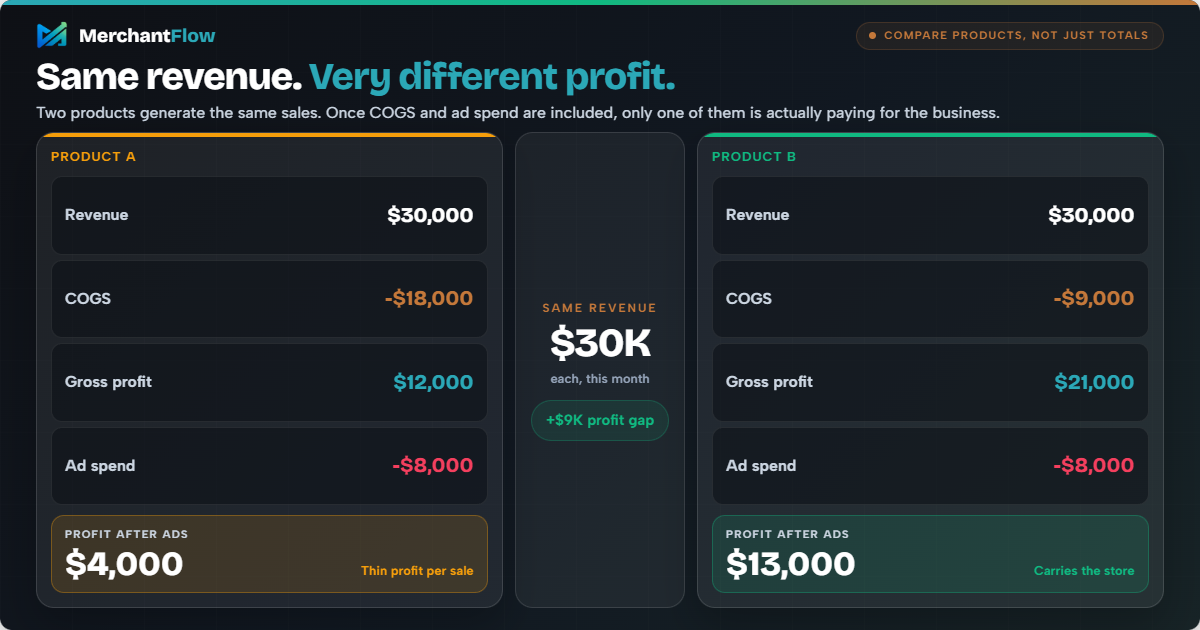
Both products generated the same revenue.
But Product B created much more profit.
This is why ecommerce brands should not only ask, “What sold?”
They should ask, “What sold profitably?”
6. Compare performance over time
A single P&L tells you what happened in one period.
Comparing P&L reports over time helps you spot trends.
Look for:
- Revenue growth
- Gross margin changes
- Net profit margin changes
- Ad spend efficiency
- Rising fulfilment costs
- Increasing refund rates
- Products becoming less profitable
The goal is not just to know whether you made money last month.
The goal is to understand why.
Manual vs automated P&L tracking
There are two main ways ecommerce brands track profit and loss.
Manual P&L tracking
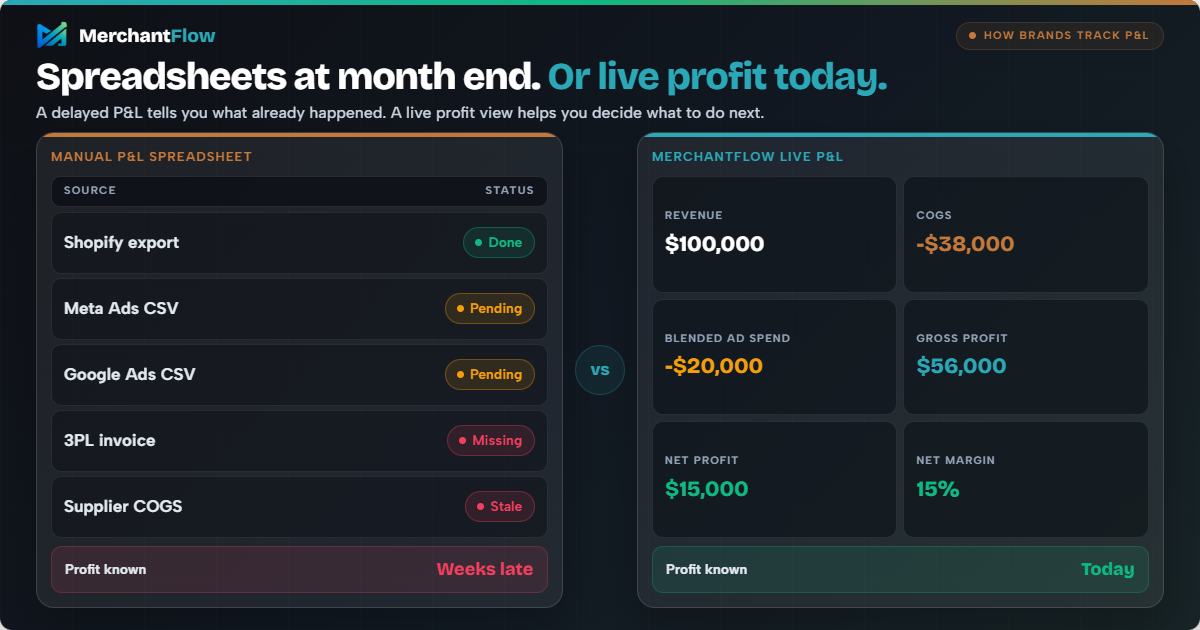
Many brands start with spreadsheets.
This can work when the business is small and costs are simple.
Manual tracking usually involves exporting data from Shopify, ad platforms, payment processors and accounting software, then combining it into a spreadsheet.
The problem is that ecommerce data is often scattered.
Revenue is in Shopify.
Ad spend is in Google Ads, Meta Ads, TikTok Ads or Snapchat Ads.
Product costs might be in Shopify, a spreadsheet or supplier records.
Shipping and fulfilment costs may be in a 3PL invoice.
Payment fees may sit inside your payment provider.
Refunds and discounts need to be matched back to orders.
Manual tracking can become slow, messy and easy to get wrong.
Automated P&L tracking
Automated P&L tracking connects your key data sources and calculates profit more regularly.
For ecommerce brands, this can make P&L more useful because it becomes part of daily decision-making rather than something reviewed weeks later.
Automated profit tracking is particularly useful for ecommerce because revenue, COGS and advertising data can change every day. Bringing those numbers together reduces the need to manually rebuild spreadsheets and makes profitability easier to monitor between formal accounting periods.
This matters because ecommerce operators often need to make fast decisions.
- Should we increase ad spend?
- Should we discount this product?
- Should we reorder this SKU?
- Should we pause a campaign?
- Should we raise prices?
- Should we keep pushing this bestseller?
A delayed P&L can tell you what happened.
A live profit view can help you decide what to do next.
How MerchantFlow helps ecommerce brands track P&L
MerchantFlow brings the data behind ecommerce profitability into one place. It combines store revenue with COGS, refunds, ad spend, shipping, fulfilment, payment fees and other expenses so merchants can see store-level and product-level profit without manually rebuilding the same spreadsheet every week.
That makes it easier to answer questions such as which products are actually making money, whether increased ad spend is improving profit and which costs are reducing margin.
You can start with the free Ecommerce P&L Builder if you want to calculate your numbers manually, or use MerchantFlow to track the same profitability data continuously across your store.
Common P&L mistakes ecommerce brands make
1. Assuming revenue means profit
Revenue is only the starting point.
A high-revenue store can still have weak profit if costs are too high.
2. Only looking at return on ad spend
Return on ad spend compares revenue to ad spend.
It does not automatically include product costs, fulfilment costs, transaction fees, refunds or operating expenses.
That means a campaign can look good in an ad platform while producing weak profit overall.
3. Not updating COGS
If your product costs are outdated, your P&L will be wrong.
This can lead to poor pricing, bad campaign decisions and incorrect product profitability analysis.
4. Ignoring small costs
Small costs add up.
Payment fees, packaging, apps, samples, influencer gifting, returns and agency fees can all reduce margin.
5. Reviewing profit too late
A month-end P&L is useful, but it may be too late for fast-moving ecommerce decisions.
If ad spend is climbing or a product margin is shrinking, waiting until the end of the month can be expensive.
6. Not looking at product-level profit
Store-level profit can hide product-level problems.
Some products may be carrying the business while others quietly reduce margin.
Best practices for ecommerce P&L tracking
To make your P&L more useful, keep it practical.
Track revenue, but do not stop there.
Keep COGS updated.
Include all major variable costs.
Separate refunds and discounts from revenue.
Track ad spend across every paid channel.
Review gross profit and net profit.
Compare product profitability.
Check trends over time.
Use monthly P&L reporting for financial review.
Use live or weekly profit tracking for operational decisions.
A strong ecommerce P&L should help you make decisions, not just understand the past.
How to use your ecommerce P&L to make better decisions
P&L is one of the most important concepts in ecommerce.
It shows whether your business is actually profitable after costs, not just whether your store is generating sales.
Revenue can look impressive.
Order volume can look exciting.
Return on ad spend can look healthy.
But none of those metrics tell the full story on their own.
A clear P&L helps you understand what is really happening across revenue, product costs, ad spend, fulfilment, refunds, fees and operating expenses.
For ecommerce brands, that clarity matters.
Because the goal is not just to sell more.
The goal is to keep more of what you sell.
Want to see what that looks like with your own numbers? Use MerchantFlow's free Ecommerce P&L Template & Builder to calculate revenue, margins and profit.
Profit and Loss (P&L) FAQs
What does P&L stand for?
P&L stands for profit and loss. It shows whether a business made money or lost money over a specific period.
What does PnL mean?
PnL means profit and loss. PnL, PNL and P&L are different ways of writing the same term. In a business context, they generally refer to a profit and loss statement showing revenue, expenses and the resulting profit or loss over a specific period.
What is the difference between revenue and profit?
Revenue is the total amount of money earned from sales before expenses.
Profit is what remains after expenses are deducted.
What is the difference between gross profit and net profit?
Gross profit is revenue minus cost of goods sold.
Net profit is what remains after all expenses are included, such as ad spend, shipping, fulfilment, payment fees, software and operating costs.
Why is P&L important for ecommerce?
P&L helps ecommerce brands understand whether sales are actually profitable. It shows how much money is left after costs such as COGS, ad spend, shipping, fulfilment and refunds.
How often should ecommerce brands review P&L?
Most businesses review P&L monthly, quarterly or yearly. Ecommerce brands spending heavily on ads should also review profit weekly or daily so they can respond quickly to margin changes.
Is P&L the same as cash flow?
No. P&L shows profitability over a period. Cash flow shows the movement of cash in and out of the business.
A business can be profitable on paper but still have cash flow issues because of inventory purchases, delayed payouts or other timing differences.
Can a product have high revenue but low profit?
Yes. A product can sell well but still have low profit if its COGS, ad spend, shipping, returns or fulfilment costs are too high.
How does MerchantFlow help with P&L?
MerchantFlow helps Shopify merchants track real profit by combining revenue, COGS, ad spend and product-level profitability in one dashboard. It is built to help ecommerce operators understand which products and channels are actually making money after costs.

About the author
Georgia CarapetisGeorgia Carapetis is Head of Marketing at MerchantFlow, helping ecommerce brands stop obsessing over ROAS and start focusing on profit. She writes about Google Shopping, contribution margins, and scaling without shrinking your margins.