
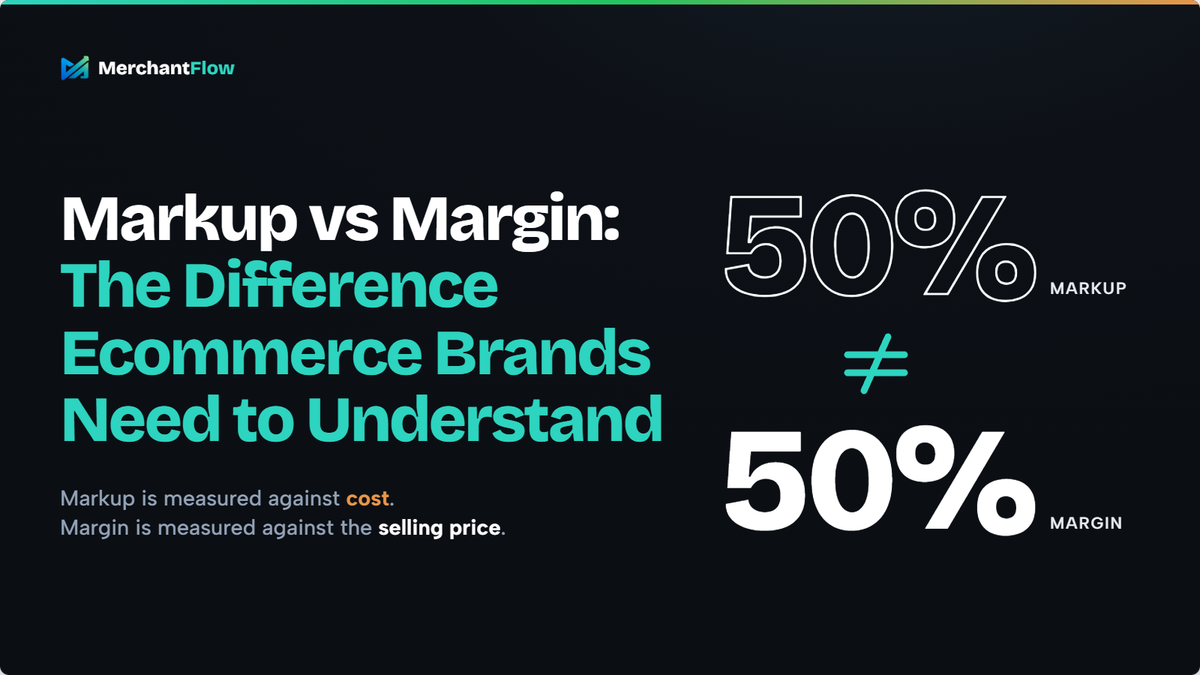
A product costs you $40.
You want to make "50%" on it.
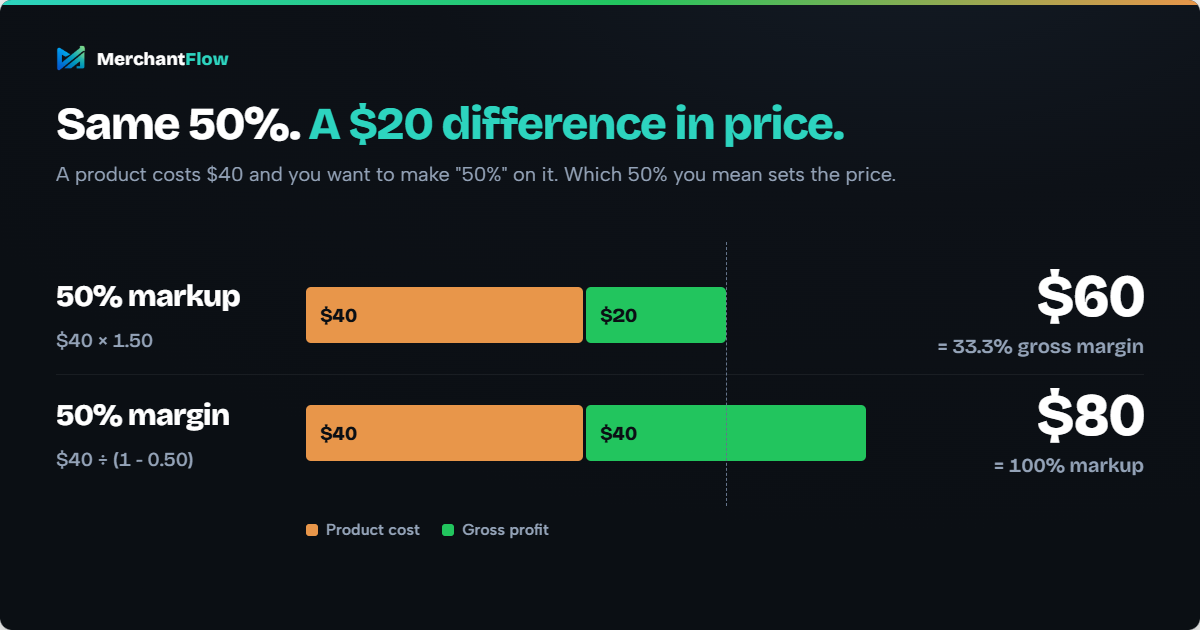
If you mean a 50% markup, the selling price is $60.
If you mean a 50% margin, the selling price is $80.
Same product. Same percentage. A $20 difference in selling price.
That is why confusing markup and margin is more than an accounting terminology problem. For an ecommerce brand repricing hundreds of SKUs, planning a promotion or deciding how much it can afford to spend on customer acquisition, using the wrong percentage can quietly change the economics of every order.
Markup and margin describe the same gross profit from different perspectives:
Markup compares gross profit with product cost.
Margin compares gross profit with selling price.
The maths is straightforward once you know which number belongs in the denominator.
The more important question for ecommerce operators is what happens after that calculation.
A product can have a healthy markup and an attractive gross margin, then lose most or all of that profit after discounts, shipping, fulfilment, payment fees and advertising.
So first, let us get the formulas right. Then we will follow the numbers far enough to understand what a product is actually leaving behind.
Markup vs margin: the quick answer
| Markup | Margin | |
|---|---|---|
| Measures gross profit against | Product cost | Selling price |
| Formula | Gross profit ÷ cost × 100 | Gross profit ÷ selling price × 100 |
| Most useful for | Building a price from cost | Evaluating profitability |
| $40 cost, $60 selling price | 50% | 33.3% |
The dollar profit in that example is $20 either way. Only the number you compare that $20 against changes.
Xero uses the same fundamental distinction between markup and margin, with markup calculated against cost and margin calculated against selling price.
Throughout the basic pricing calculations in this guide, when we refer to "margin", we mean gross margin unless otherwise stated.
That distinction becomes important later when we move beyond product cost and start looking at contribution margin and actual product profitability.
How to calculate markup
Markup tells you how much gross profit you have added on top of your product cost.
Markup formula
Markup % = (Selling price - Product cost) ÷ Product cost × 100
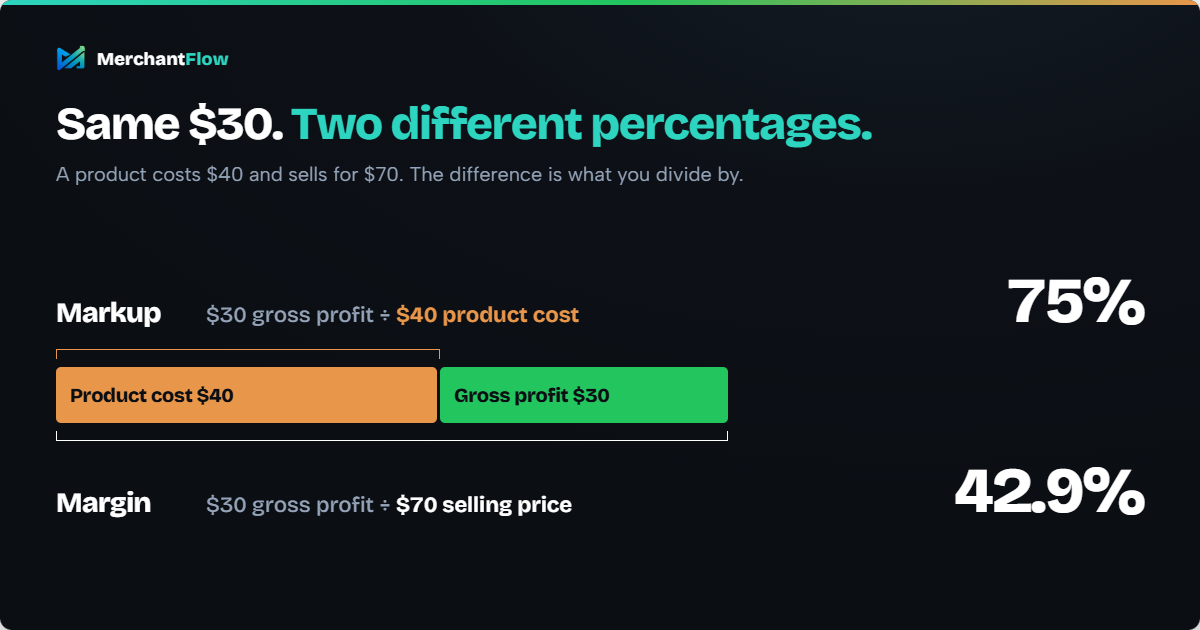
Suppose a product costs $40 and sells for $70.
Gross profit per unit is:
$70 - $40 = $30
Markup is:
$30 ÷ $40 × 100 = 75%
The product therefore has a 75% markup.
How to calculate selling price from a target markup
If you already know the product cost and the markup you want, use:
Selling price = Cost × (1 + Markup)
Enter the percentage as a decimal. A 75% markup becomes 0.75.
For a $40 product with a 75% markup:
$40 × 1.75 = $70
Markup is particularly useful when your starting question is:
"This product costs us $40. How much should we add?"
If you want to calculate this without doing the formula manually, MerchantFlow's markup calculator shows selling price, markup, gross margin and gross profit from the same product cost.
Markup does not, however, tell you what percentage of the selling price becomes gross profit.
For that, you need margin.
How to calculate margin
Margin measures the same gross profit relative to the selling price.
Margin formula
Margin % = (Selling price - Product cost) ÷ Selling price × 100
Return to the previous example:
Selling price: $70
Product cost: $40
Gross profit: $30
Margin:
$30 ÷ $70 × 100 = 42.9%
The product therefore has:
75% markup
but:
42.9% gross margin
Both figures are correct.
They simply answer different questions.
How to calculate selling price from a target margin
If you know the gross margin you want the product to achieve, use:
Selling price = Cost ÷ (1 - Target margin)
If the product costs $40 and you want a 50% gross margin:
$40 ÷ (1 - 0.50) = $80
At an $80 selling price:
$40 gross profit ÷ $80 selling price = 50% margin
Notice what happens if you accidentally apply a 50% markup instead.
$40 × 1.50 = $60
That $60 selling price produces only:
$20 ÷ $60 = 33.3% margin
A 50% markup is not a 50% margin.
That is the pricing mistake to avoid.
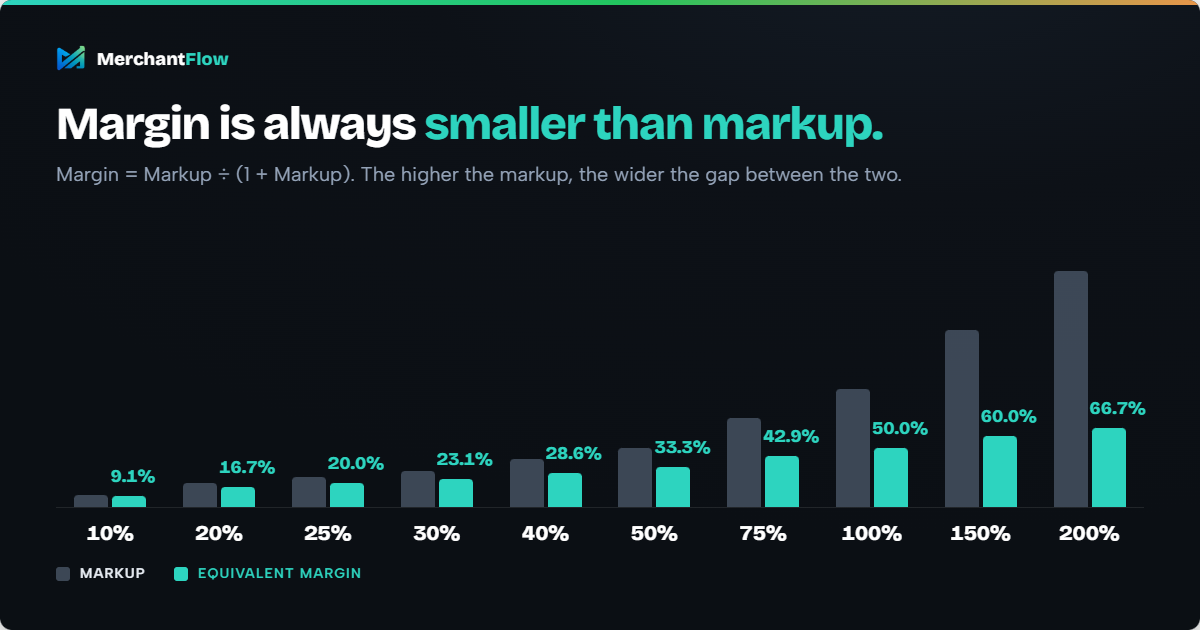
Markup to margin conversion chart
You do not need to calculate the conversion manually every time.
| Markup | Equivalent margin |
|---|---|
| 10% | 9.1% |
| 20% | 16.7% |
| 25% | 20.0% |
| 30% | 23.1% |
| 40% | 28.6% |
| 50% | 33.3% |
| 75% | 42.9% |
| 100% | 50.0% |
| 150% | 60.0% |
| 200% | 66.7% |
You can also convert between the two directly.
Markup to margin formula
Margin = Markup ÷ (1 + Markup)
Margin to markup formula
Markup = Margin ÷ (1 - Margin)
Use percentages as decimals in these formulas.
For example, a 50% markup becomes 0.50:
0.50 ÷ 1.50 = 0.333
So a 50% markup produces a 33.3% margin.
Why confusing markup and margin causes expensive pricing mistakes
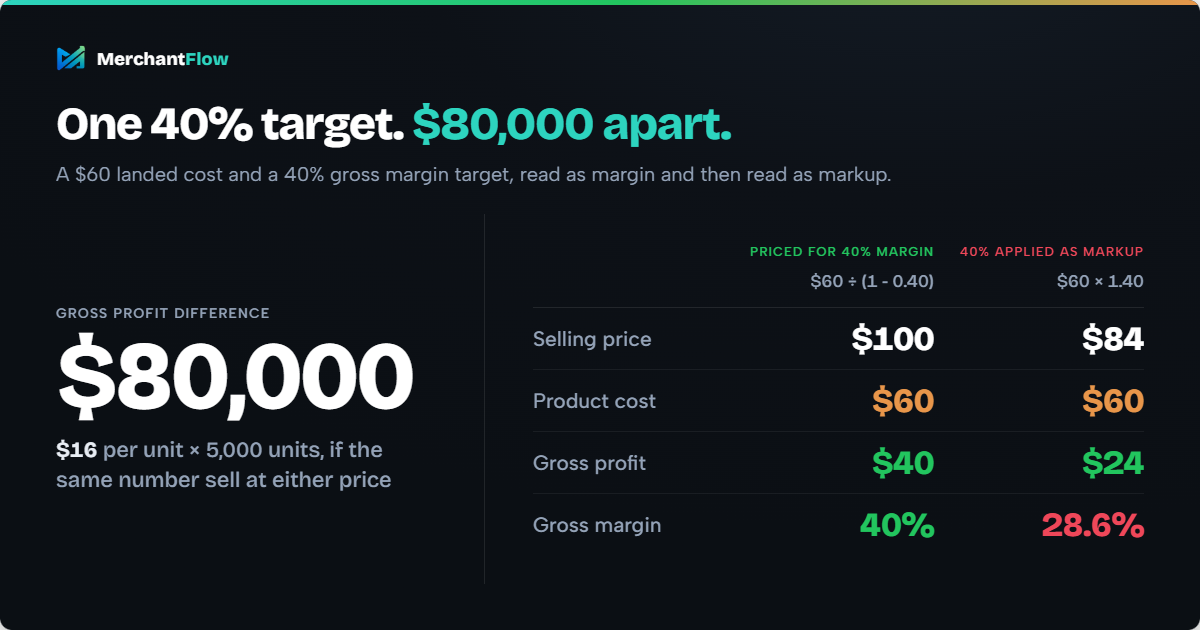
Suppose your landed product cost is $60 and you have decided the SKU needs a 40% gross margin.
The correct selling price is:
$60 ÷ (1 - 0.40) = $100
At $100:
- Revenue per unit = $100
- Product cost = $60
- Gross profit = $40
- Gross margin = 40%
Now imagine someone interprets the 40% target as markup instead:
$60 × 1.40 = $84
At $84:
- Revenue per unit = $84
- Product cost = $60
- Gross profit = $24
- Gross margin = 28.6%
You wanted a 40% margin.
You got 28.6%.
That is a $16 difference in gross profit per unit.
Across 5,000 units, that represents an $80,000 difference in gross profit between the two price points, assuming the same number of units could be sold.
Of course, pricing is not determined by a formula alone.
Increasing the price from $84 to $100 could affect conversion rate, demand, positioning and how the product compares with competitors.
That is exactly why the calculation needs to be correct first.
You want to make an intentional decision that $84 is the better commercial price, not arrive there accidentally because two percentages were confused.
Should ecommerce brands use markup or margin?
Neither metric is universally better.
They are useful for different decisions.
| Ecommerce question | Useful starting metric |
|---|---|
| How much should I add to product cost? | Markup |
| What selling price achieves my target gross margin? | Gross margin |
| How much of sales remains after COGS? | Gross margin |
| What happens if I discount this SKU? | Gross profit and gross margin |
| Can this product afford paid acquisition? | Contribution margin |
| Which SKU is actually making more money? | Product-level contribution profit |
| Is the business profitable overall? | Net profit and net margin |
Use markup when building a price from cost
Markup is convenient when you know what a new SKU costs and need a starting selling price.
For example:
"Our landed cost is $25 and we normally apply an 80% markup."
That gives you:
$25 × 1.80 = $45
This makes markup useful for cost-plus pricing.
Use margin when evaluating profitability
Margin is usually easier to interpret once you want to understand what your selling price leaves behind.
A 40% gross margin means that roughly $0.40 of every $1 of sales remains as gross profit after the product costs included in your COGS calculation.
That makes margin useful when:
- comparing products with different selling prices
- reviewing the impact of supplier cost increases
- evaluating product mix
- testing price changes
- stress-testing promotions
- determining how much room remains for other costs
For Shopify merchants, there is also an important difference between the margin calculated from a list price and the margin actually realised after sales occur. Shopify's profit reports use net sales and product cost when calculating gross profit and margin, which means discounts and refunds can affect the result.
What is a good markup or margin for ecommerce?
There is no single markup or gross margin percentage that is automatically "good" for every ecommerce store.
The percentage needs to support the economics underneath the product.
Depending on your business model, gross profit may still need to cover:
- outbound shipping
- fulfilment or pick-and-pack
- payment processing
- platform or marketplace fees
- returns
- customer acquisition
- operating expenses
- the actual profit the business wants to retain
Consider two products that both sell for $100.
Product A
- Selling price: $100
- Gross margin: 60%
- Paid acquisition cost: $35
Product B
- Selling price: $100
- Gross margin: 45%
- Mostly organic and repeat-customer sales
Product A has the higher gross margin.
That does not automatically make it the more profitable product.
A better question than:
"What margin should an ecommerce store have?"
is:
"What margin does this product need to support our cost structure and still leave an acceptable profit?"
That answer can differ significantly between products, channels and businesses.
Use the right product cost before calculating margin
A margin calculation is only as useful as the cost you put into it.
One common mistake is treating the supplier's invoice price as the complete cost of the product.
Suppose your manufacturer charges $18 per unit.
Before that product becomes ready to sell, you might also incur:
- international freight
- import duty
- customs or brokerage charges
- inspection fees
- product-specific packaging
- other inbound costs
If those costs are economically part of getting the inventory into a saleable state, ignoring them can make your product margin look healthier than it really is.
For commercial pricing analysis, using a realistic landed unit cost is often more useful than looking at the factory price alone.
MerchantFlow's landed cost calculator can allocate shipment-level freight, duty and other charges across your products to estimate the cost of each unit.
The precise accounting treatment of individual costs can vary depending on your business and jurisdiction, so statutory COGS should follow the accounting approach used by your business and accountant.
For management decisions, the important principle is consistency.
If Product A is evaluated using factory cost while Product B includes freight and duty, their margins are not directly comparable.
Gross margin is only the beginning
This is where markup and margin become more useful for ecommerce decision-making.
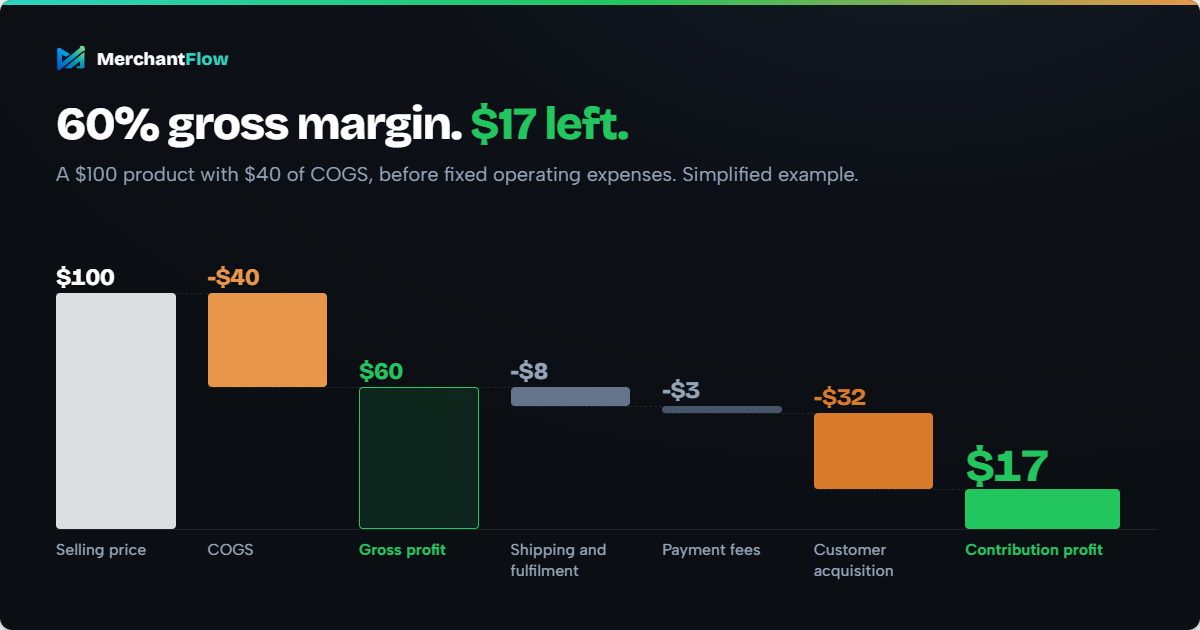
Suppose a product sells for $100 and has $40 of COGS.
You have:
$60 gross profit
and:
60% gross margin
That looks healthy.
But the $60 of gross profit may still need to absorb the costs of actually generating and fulfilling the order.
Imagine the order also incurs:
- Shipping and fulfilment: $8
- Payment fees: $3
- Customer acquisition cost: $32
The simplified contribution profit becomes:
$100 - $40 - $8 - $3 - $32 = $17
The product had a 60% gross margin.
Only $17 remains in this simplified example before fixed operating expenses.
Gross margin answers:
"How much remains after product cost?"
It does not necessarily answer:
"How much money did we make from selling this product?"
This is why ecommerce businesses need to distinguish between gross margin and contribution margin.
Contribution margin goes further by accounting for additional variable costs associated with making the sale.
The precise definition of contribution margin can vary between businesses depending on which costs they classify as variable. What matters is defining the calculation clearly and applying the same method consistently.
If you want to see how each layer of cost changes the economics of an individual order, MerchantFlow's Shopify profit margin calculator separates gross margin, contribution margin and net margin.
How discounts can destroy margin faster than expected
Discounting is one of the clearest examples of why ecommerce merchants need to think in margin rather than revenue alone.
Suppose a product:
- sells for $80
- costs $40
- generates $40 gross profit
- has a 50% gross margin
Now run a 20% discount.
The selling price falls to:
$64
The product still costs:
$40
Gross profit becomes:
$24
Gross margin becomes:
$24 ÷ $64 = 37.5%
Revenue per unit fell by 20%.
Gross profit per unit fell by 40%.
That is the important part.
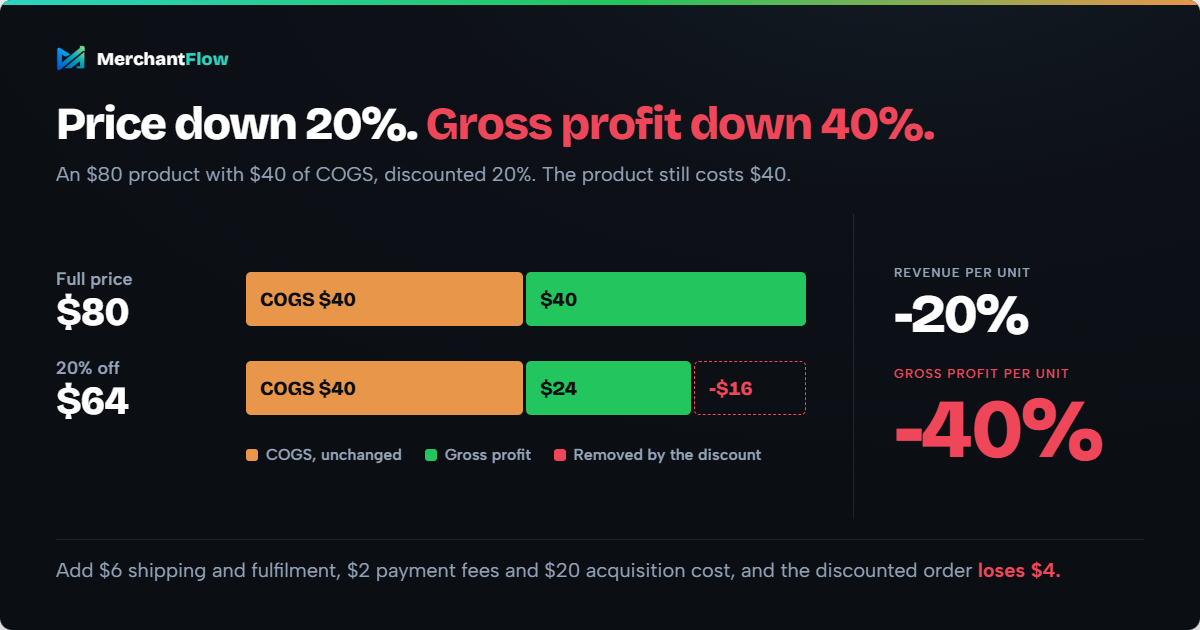
The discount is applied to the entire selling price, but the lost revenue comes directly out of the gap between selling price and product cost.
That does not mean discounts are necessarily bad.
A promotion might:
- increase conversion rate
- acquire customers who later repurchase
- help clear ageing inventory
- increase order volume
- increase total contribution profit despite lower profit per unit
Those are commercial outcomes worth measuring.
Simply saying "revenue increased during the sale" does not tell you whether the promotion actually worked.
A healthy gross margin can still produce an unprofitable order
Continue with that discounted product.
Selling price: $64
Product cost: $40
Gross profit: $24
Gross margin: 37.5%
Now imagine the order also incurs:
Shipping and fulfilment: $6
Payment fees: $2
Allocated customer acquisition cost: $20
Contribution profit becomes:
$64 - $40 - $6 - $2 - $20 = -$4
The product had a positive gross margin.
The order still lost $4 in this simplified scenario.
This is why "margin" should not be treated as one universal profitability number.
Depending on the decision, you may be looking at:
- gross margin
- contribution margin
- operating margin
- net margin
They answer different questions.
For product pricing, gross margin is a useful starting point.
For deciding whether to increase Google Ads or Meta Ads spend behind a product, contribution profitability may be much more informative.
For understanding whether the business made money overall, you need to go further again and account for operating expenses.
Margin determines how much you can afford to spend on advertising
This distinction becomes particularly important for ecommerce brands spending heavily on paid acquisition.
ROAS compares the conversion value generated by advertising with the cost of that advertising.
Google Ads also uses this relationship in its Target ROAS bidding strategy, where advertisers can set an average return on ad spend they want the bidding system to target.
But ROAS does not automatically subtract COGS, fulfilment costs, payment fees or other product expenses.
That means two products can produce the same ROAS and very different profit outcomes.
Suppose Product A and Product B each generate $400 in sales from $100 of advertising.
Both have:
$400 ÷ $100 = 4x ROAS
But imagine:
Product A
- Revenue: $400
- COGS: $100
- Ad spend: $100
Product B
- Revenue: $400
- COGS: $240
- Ad spend: $100
The advertising dashboard shows the same 4x ROAS.
The underlying economics are very different.
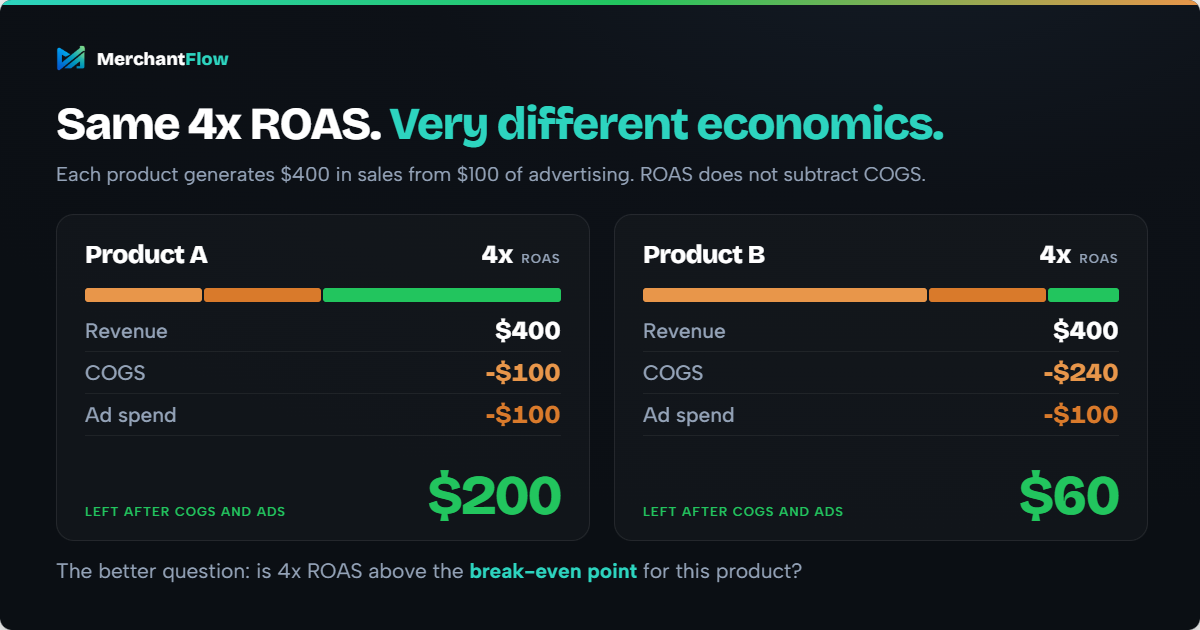
That is why the more useful question is often not:
"Is 4x ROAS good?"
It is:
"Is 4x ROAS above the break-even point for this product?"
How margin affects break-even ROAS
If 40% of revenue remains available to pay for advertising after the other costs included in your calculation:
Break-even ROAS = 1 ÷ 0.40 = 2.5x
If only 25% remains:
Break-even ROAS = 1 ÷ 0.25 = 4x
Lower-margin products generally need stronger advertising efficiency to reach the same profitability threshold.
You can use MerchantFlow's break-even ROAS calculator to estimate that threshold using your own product economics.
Break-even ROAS helps evaluate whether advertising can work economically at a particular margin. If you want to look at advertising efficiency across multiple campaigns or channels instead, blended ROAS provides a broader view by comparing total store revenue with total advertising spend.
ROAS is not the same as product profitability
This distinction is easy to miss when marketing data and ecommerce data live in different systems.
Google Ads can tell you what revenue it attributes to a campaign.
Meta Ads can tell you what revenue it attributes to its ads.
Your ecommerce platform can tell you what customers ordered.
Your product records contain COGS.
Payment providers and fulfilment systems may hold another layer of costs.
Looking at each source independently can answer useful questions, but it becomes much harder to answer the one that ultimately matters:
"After the costs involved in selling this product, how much money did we actually make?"
That is why a bestselling product is not necessarily your most profitable product, and a campaign with the highest ROAS is not automatically the campaign creating the most profit.
MerchantFlow's product profitability calculator can be used as a quick check of how COGS, advertising, fees, refunds and other costs affect the economics of an individual product.
A practical ecommerce pricing process
Rather than choosing a markup percentage and hoping the economics work later, price backwards from the business model.
1. Establish a realistic unit cost
Start with what the product genuinely costs you to get into a saleable state.
If inbound freight, duty or other costs materially affect unit economics, account for them consistently.
2. Decide what gross margin the product needs
Do not copy an arbitrary benchmark simply because another retailer uses it.
Ask what the gross profit needs to support.
A brand with expensive acquisition, free shipping and high return rates may require significantly more gross-margin headroom than a brand generating mostly organic demand with inexpensive fulfilment.
3. Calculate the selling price required
Use:
Selling price = Cost ÷ (1 - Target margin)
This works backwards from the gross margin you want rather than accidentally applying that percentage as markup.
4. Test the price against the market
The formula tells you what your economics require.
It does not tell you what customers will pay.
Compare the result with:
- competing products
- perceived value
- positioning
- historical conversion rate
- demand
- customer lifetime value
If customers will not support the price your economics require, the problem may be the underlying cost structure rather than the pricing formula.
5. Stress-test your normal discounts
Calculate gross profit and margin at the promotional prices customers actually pay.
If your store regularly runs 10%, 20% or 25% discounts, your full-price margin is not the only number that matters.
6. Add the costs required to generate the sale
Model the variable costs that materially affect your business.
Depending on the store, these may include advertising, fulfilment, shipping subsidies, payment fees, refunds and marketplace costs.
7. Calculate the break-even acquisition point
Once you understand the contribution available before advertising, calculate how much you can afford to spend acquiring the order.
This gives paid media teams a financial threshold rather than an arbitrary ROAS target.
8. Compare the model with real performance
Your pricing model contains assumptions.
Real orders provide evidence.
Review actual selling prices, discounts, COGS, advertising costs and other meaningful expenses to understand which products are genuinely producing profit.
This is also where store-wide averages become less useful. One SKU can be highly profitable while another generates significant revenue but very little contribution profit.
Common markup and margin mistakes
Treating a 50% markup as a 50% margin
A 50% markup produces a 33.3% margin.
A 50% margin requires a 100% markup.
Always clarify which percentage a pricing target refers to.
Using supplier price instead of realistic product cost
If material inbound costs are missing from your unit cost, your calculated gross margin may look stronger than the economics really are.
Calculating margin from full price when customers rarely pay full price
If a SKU is frequently discounted, model the realised selling price as well as the recommended retail price.
Looking at gross margin without examining selling costs
A strong gross margin does not guarantee strong contribution profit once fulfilment, payment fees, returns and customer acquisition are included.
Assuming strong ROAS guarantees strong product economics
ROAS does not automatically account for COGS.
Two products can have identical ROAS but produce very different profits.
Using the same margin target across every SKU
Different products can have different:
- COGS
- shipping costs
- return rates
- discount behaviour
- acquisition costs
- fulfilment requirements
Store-wide averages can hide those differences.
Price for the margin you actually need
Markup and margin begin with the same two numbers: cost and selling price.
But they tell the story from different directions.
Markup tells you how far the selling price sits above cost.
Margin tells you how much of the selling price remains after that cost.
For ecommerce brands, that is only the beginning.
The product still needs to survive discounts, payment fees, fulfilment, returns, advertising and the other costs involved in generating the sale.
Use markup to help construct prices.
Use gross margin to understand what those prices leave behind after COGS.
Then follow the economics through contribution profit before deciding which products are genuinely worth scaling.
Doing that manually for one product is straightforward.
Doing it continuously across hundreds or thousands of orders, SKUs and advertising campaigns is where spreadsheets and disconnected dashboards become much harder to maintain.
MerchantFlow brings ecommerce sales, product costs and advertising performance together so merchants can see which products, campaigns and channels are actually contributing profit rather than relying on revenue or ROAS alone.
The goal is not simply to know which products sell the most.
It is to answer the more useful question:
Which products are actually making me money after ads and cost of goods?
Track your product margins and profitability with MerchantFlow
Knowing the difference between markup and margin helps you price products correctly. Tracking what happens to those margins after discounts, advertising, fees and other selling costs is what helps you understand which products are actually making money.
MerchantFlow brings your ecommerce sales, advertising spend and product costs into one profit-focused view, so you can compare product-level profitability without manually reconciling multiple dashboards and spreadsheets.
See which products are generating revenue, which are contributing real profit, and which may be costing more to scale than they return.
Start your 14-day free trial and see which products are actually profitable.
Frequently asked questions
Is a 50% markup the same as a 50% margin?
No.
If a product costs $100, applying a 50% markup gives you:
$100 × 1.50 = $150 selling price
Gross profit is $50.
Margin is:
$50 ÷ $150 = 33.3%
To achieve a 50% gross margin on a $100 cost, the selling price must be:
$100 ÷ (1 - 0.50) = $200
A 50% margin therefore requires a 100% markup.
What is the main difference between markup and margin?
Markup expresses gross profit as a percentage of product cost.
Margin expresses gross profit as a percentage of selling price.
Markup is particularly useful when building a selling price from cost. Gross margin is more useful when evaluating what proportion of the selling price remains after COGS.
How do I convert markup to margin?
Use:
Margin = Markup ÷ (1 + Markup)
Enter the percentage as a decimal.
For a 50% markup:
0.50 ÷ 1.50 = 0.333
So a 50% markup equals a 33.3% margin.
How do I convert margin to markup?
Use:
Markup = Margin ÷ (1 - Margin)
For a 40% margin:
0.40 ÷ 0.60 = 0.667
So a 40% margin requires approximately a 66.7% markup.
What markup gives a 40% margin?
A 40% gross margin requires approximately a 66.7% markup.
For example, if a product costs $60:
$60 × 1.667 ≈ $100 selling price
Gross profit is $40.
$40 ÷ $100 = 40% margin
What markup gives a 50% margin?
A 50% gross margin requires a 100% markup.
If a product costs $40, you need to sell it for $80.
Gross profit is $40, which represents 50% of the $80 selling price.
Should ecommerce brands use markup or margin for pricing?
Use both for different purposes.
Markup is useful when you start with a product cost and want to build a selling price.
Gross margin is more useful when you want to understand how much of the selling price remains after COGS.
For broader ecommerce decisions, you should then examine contribution margin and product-level profitability after other variable costs.
What is a good profit margin for ecommerce?
There is no single good profit margin for every ecommerce product or business, and it is important to distinguish between gross, contribution and net margin.
As a broad retail reference, Shopify cites gross profit margins of around 30% to 50% and net profit margins of around 2% to 10%. These are benchmarks rather than targets. The margin your ecommerce business needs depends on product cost, fulfilment, shipping, payment fees, discounts, return rates, acquisition costs, operating expenses and the profit you ultimately want to retain.
Rather than copying an industry benchmark, use it as a sense-check and work backwards from the costs your gross profit needs to support.
Does gross margin include advertising costs?
Normally, no.
Gross margin generally measures what remains after COGS.
Advertising spend is typically considered separately when analysing contribution profitability.
That distinction matters because a product can have a strong gross margin but still be unprofitable after customer acquisition and other variable selling costs.
Can a product with a high ROAS still lose money?
Yes.
ROAS compares advertising-generated revenue or conversion value with advertising spend.
It does not automatically account for COGS, fulfilment, payment fees, refunds or other costs.
A product with expensive COGS can therefore produce an impressive ROAS while generating relatively little contribution profit.
Why does a discount reduce profit more than revenue?
Because COGS usually does not fall when you discount the selling price.
If an $80 product with $40 of COGS is discounted by 20%, revenue falls to $64.
Revenue dropped by 20%, but gross profit fell from $40 to $24, a 40% reduction.
The discount comes directly out of the amount available between selling price and product cost.

About the author
Georgia CarapetisGeorgia Carapetis is Head of Marketing at MerchantFlow, helping ecommerce brands stop obsessing over ROAS and start focusing on profit. She writes about Google Shopping, contribution margins, and scaling without shrinking your margins.