Your Shopify store can have its best sales month ever and still leave you wondering where the profit went.
Revenue might be growing. Your ad accounts might show healthy ROAS. Orders might be up.
But none of those numbers tells you what the products you sold actually cost.
That is what cost of goods sold, or COGS, starts to answer.
For a Shopify store, getting COGS right means more than knowing your supplier's unit price. You need reliable product costs, accurate variant data and a clear understanding of which costs belong in inventory versus fulfilment, advertising and operating expenses.
This guide explains how to calculate COGS for a Shopify store, how Shopify's Cost per item field works, what to include in your product costs and how to use COGS to make better pricing and advertising decisions.
How do you calculate COGS for a Shopify store?
The standard COGS formula is:
COGS = Beginning inventory + inventory purchases and acquisition costs - Ending inventory
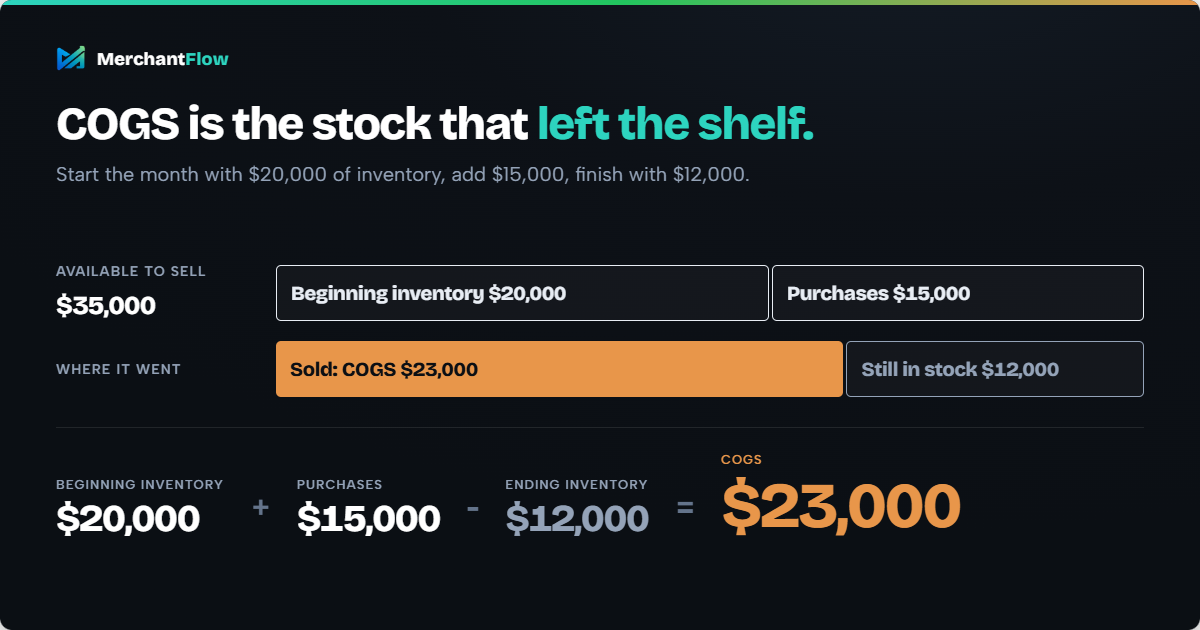
For example, suppose your store starts the month with $20,000 of inventory, adds $15,000 of inventory during the month and finishes with $12,000 of inventory.
Your COGS is:
$20,000 + $15,000 - $12,000 = $23,000
That means $23,000 of inventory cost was associated with the goods sold during the month.
For product-level ecommerce analysis, another useful formula is:
Product COGS = Units sold × applicable unit cost
If you sell 300 units with an applicable cost of $18 per unit:
300 × $18 = $5,400 COGS
From there:
Gross profit = Net sales - COGS
and:
Gross margin % = Gross profit ÷ Net sales × 100
The formulas are straightforward.
The harder part is deciding what the unit cost should actually contain.
What is COGS in ecommerce?
Cost of goods sold is the inventory cost associated with the products you sold during a particular period.
If you buy finished products from a supplier, the purchase price is part of the inventory cost.
If you manufacture products, relevant materials, direct production labour and production overhead can also form part of the inventory cost.
Accounting standards such as IAS 2 Inventories also recognise certain costs required to bring inventory to its present location and condition, including relevant transport, handling and import costs.
This creates an important distinction for ecommerce businesses:
Buying inventory is not automatically the same as recording COGS.
The cost initially sits with the inventory. The relevant portion becomes COGS as those products are sold.
Supplier cost vs landed cost vs COGS
These terms are often used interchangeably in ecommerce conversations, but they describe different stages of the calculation.
| Term | What it means |
|---|---|
| Supplier cost | What the supplier charges for the product |
| Landed cost | The cost of getting a unit to you and into saleable condition |
| Inventory cost | The cost carried against stock that has not yet been sold |
| COGS | The inventory cost associated with goods sold during the period |
| Gross profit | Net sales minus COGS |
| Contribution profit | What remains after COGS and other relevant variable costs such as fulfilment, payment fees and advertising |
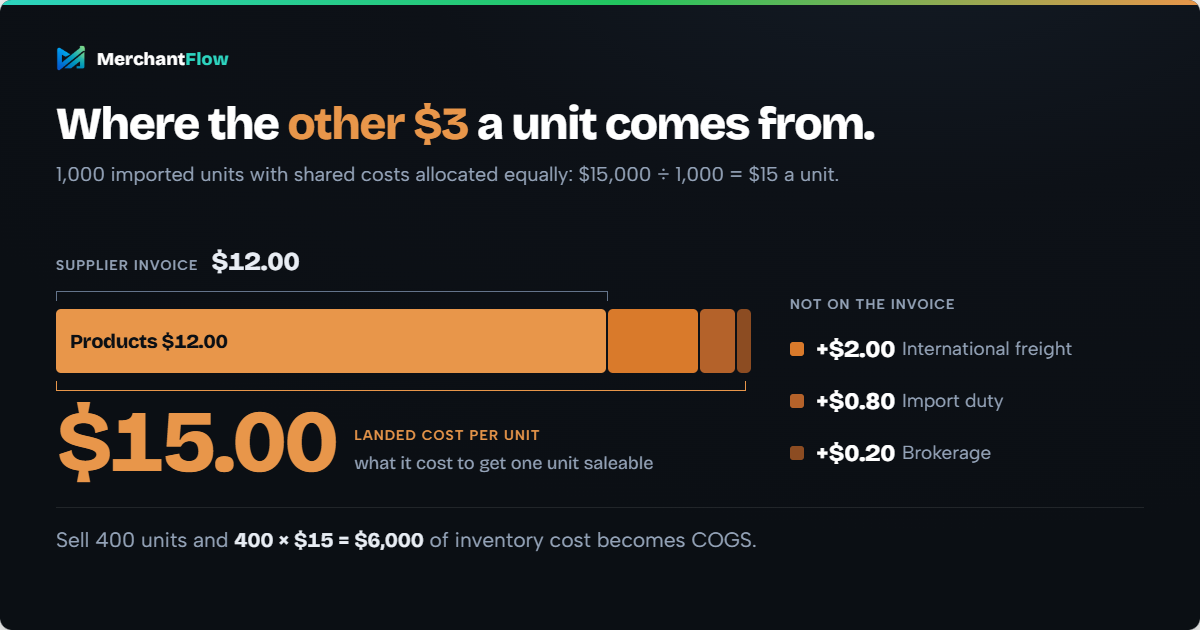
Suppose you import 1,000 units.
Your costs are:
- Products: $12,000
- International freight: $2,000
- Import duty: $800
- Brokerage: $200
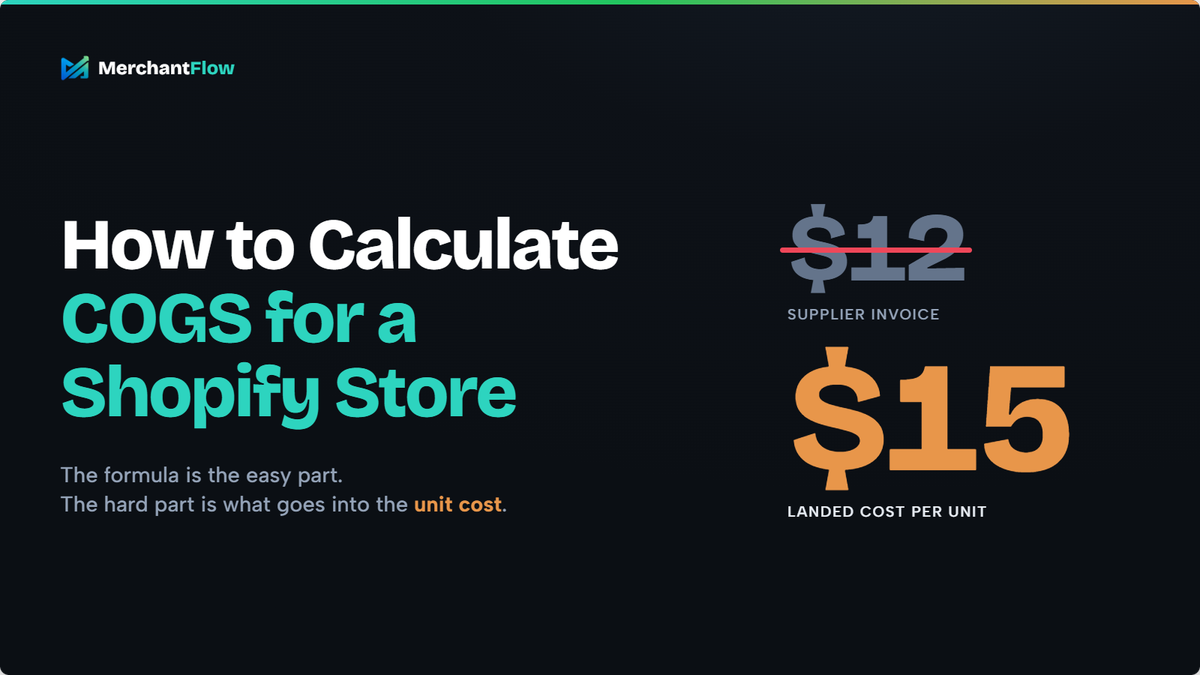
The shipment cost is $15,000 in total.
If those costs were reasonably allocated equally, the landed cost would be:
$15,000 ÷ 1,000 = $15 per unit
Your supplier invoice says $12 per unit.
Your actual cost of getting the inventory into saleable condition is $15 per unit.
If 400 units are sold, a simple unit-cost calculation would associate:
400 × $15 = $6,000 of inventory cost with those sales.
If you need to calculate this from supplier and shipment charges, MerchantFlow's free COGS Calculator can allocate the costs into a per-unit figure.
MerchantFlow also has a Landed Cost Calculator designed for shipments containing several products and shared costs such as freight, duty and brokerage.
What should be included in ecommerce COGS?
There is no universal list that applies identically to every business, accounting framework and jurisdiction.
However, the underlying principle is that inventory costs generally relate to acquiring or producing the goods and bringing them to their current location and condition.
For an ecommerce merchant, that may include:
Product purchase costs
If you buy finished products for resale, start with what you paid the supplier.
If you manufacture the product, direct materials and relevant production costs may form part of its cost.
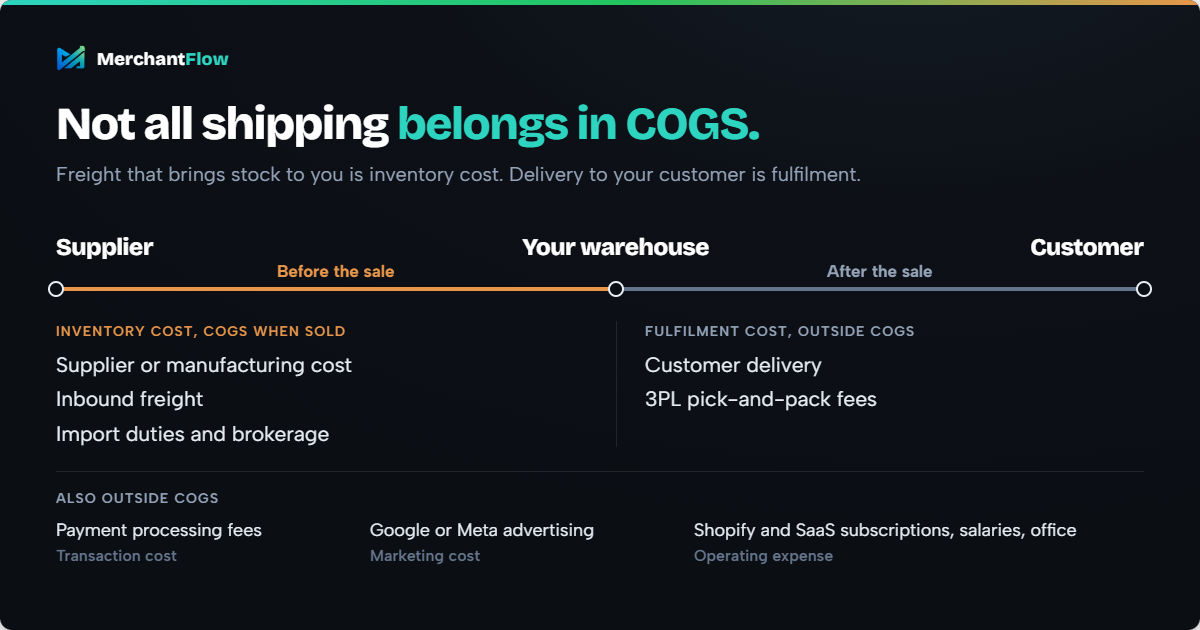
Inbound freight
The cost of transporting inventory from your supplier to your warehouse or other inventory location can form part of inventory acquisition cost.
This is different from the postage used to deliver a customer's order after a sale.
Import duties and brokerage
Relevant non-recoverable import duties and acquisition charges can also form part of inventory cost.
Recoverable taxes may need different treatment, so tax treatment should be confirmed with your accountant.
Product packaging
Packaging that forms part of the product itself may belong in product cost.
Packaging used only to fulfil an individual customer order is often more useful to track separately as fulfilment cost for management reporting.
The important point is consistency.
If your business changes what it includes in product cost from one month to another, your gross margin can move even when the underlying economics have not.
What normally sits outside COGS?
Many costs matter to profitability without belonging directly in product COGS.
For ecommerce management reporting, it is useful to separate them.
| Cost | Common management-reporting treatment |
|---|---|
| Supplier or manufacturing cost | Inventory cost, becoming COGS when sold |
| Inbound freight | Often inventory or landed cost |
| Import duties | Often inventory or landed cost |
| Customer delivery | Fulfilment cost |
| 3PL pick-and-pack fees | Fulfilment cost |
| Payment processing fees | Transaction cost |
| Google or Meta advertising | Marketing cost |
| Shopify subscription | Operating expense |
| SaaS subscriptions | Operating expense |
| General salaries | Operating expense |
| Office expenses | Operating expense |
The exact accounting treatment can vary.
For business decisions, separating these layers prevents one metric from trying to answer every profitability question.
COGS helps you understand gross profit.
Shipping, fees and advertising help you understand how much of that gross profit survives the process of acquiring and fulfilling the order.
How does Shopify track COGS?
Shopify uses the Cost per item stored against products and variants for its product-cost and profit reporting.
For resellers, Shopify Cost per item is described using the example of the amount paid to the manufacturer, excluding taxes, shipping and other costs. Shopify also allows each variant to have its own Cost per item.
That means Shopify's Cost per item and the fuller inventory cost used in your accounts or internal profitability reporting are not automatically the same thing.
For example:
Supplier price: $20
Allocated inbound freight: $3
Relevant duty and brokerage: $1
Supplier price alone: $20
Broader landed unit cost: $24
Neither figure should be blindly substituted for the other.
Decide what cost basis is appropriate for your accounts with your accountant, then make sure the cost basis used for internal profitability analysis is clearly understood.
How to enter Cost per item in Shopify
For an individual product, Shopify's current process is:
- Open Products in Shopify Admin.
- Select the product.
- Go to the pricing section.
- Enter the Cost per item.
- Save the product.
Products with variants need cost information maintained for the relevant variants.
Shopify also supports bulk editing and CSV workflows for product costs.
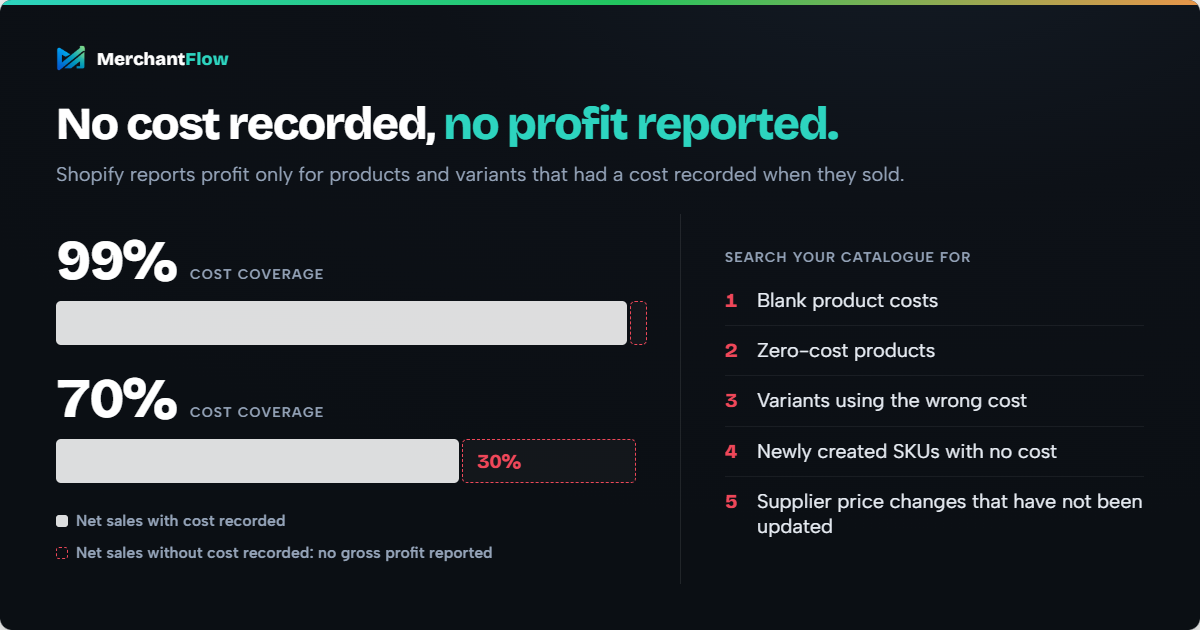
A useful COGS audit is therefore to search your catalogue for:
- blank product costs
- zero-cost products
- variants using the wrong cost
- newly created SKUs with no cost
- supplier price changes that have not been updated
A missing cost can materially distort profitability reporting.
Where can you find COGS and gross profit in Shopify?
Shopify currently provides profit reporting under Analytics > Reports.
You can filter reports by the Profit Margin category to view product and variant profitability reports in Shopify profit reports.
One detail is particularly important:
Shopify says profit is reported only for products and variants that had cost information recorded when they were sold.
If sales appear in your sales reports but not in your product profit report, missing cost data may be the reason.
Shopify's finance reporting also distinguishes between net sales with and without recorded cost, helping merchants identify sales where product-cost data may be incomplete.
That is a useful completeness check.
If a meaningful portion of your revenue sits in "Net sales without cost recorded", your gross-profit reporting is incomplete.
How to calculate Shopify COGS step by step
Step 1: Establish the unit cost for every SKU
Start at SKU or variant level rather than relying on a single blended percentage for your entire catalogue.
A size, colour or configuration can have a different cost even when it belongs to the same parent product.
If a medium product costs $8 and an XL version costs $10.50, using $8 for both overstates the margin on every XL sale.
Step 2: Work out any relevant landed costs
If you import inventory, identify costs that relate to acquiring the shipment.
For management analysis, shared shipment charges should be allocated using a sensible basis.
For example:
- freight may be allocated by weight or volume
- duty may be allocated by product value
- a flat inspection charge might reasonably be allocated by units
There is no benefit in producing an extremely precise-looking margin from an arbitrary allocation rule.
Use a basis that reflects what drove the cost and apply it consistently.
Step 3: Keep Shopify variant costs complete
Record Cost per item for every relevant variant.
Missing data creates a reporting problem because Shopify only includes products with applicable cost data in its gross-profit reporting.
A simple but useful metric is COGS coverage:
What percentage of your sales have reliable product-cost data behind them?
A gross-margin number is far more trustworthy at 99% cost coverage than at 70%.
Step 4: Account for costs changing over time
Supplier costs rarely stay fixed forever.
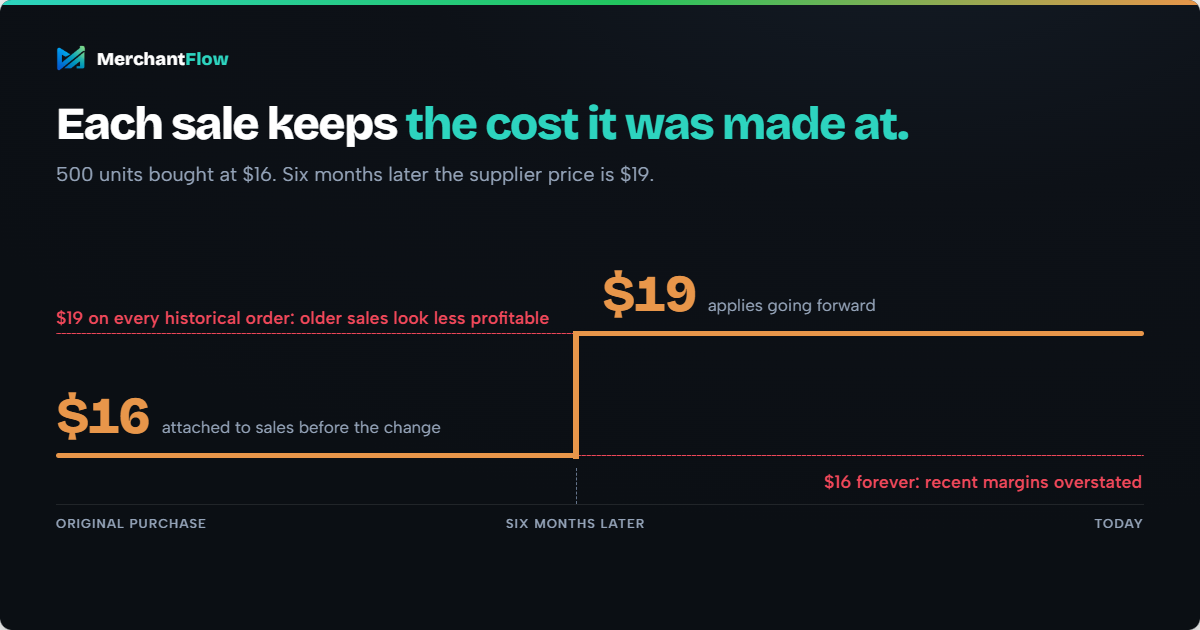
Suppose you originally purchase 500 units for $16 each.
Six months later, the supplier price becomes $19.
Using $16 forever will overstate recent margins.
Using $19 against every historical order can make older sales appear less profitable than their economics at the time.
Inventory accounting can use cost-flow methods such as FIFO or weighted average depending on the applicable accounting framework. IAS 2 recognises FIFO and weighted average for ordinarily interchangeable inventory.
For operational profitability analysis, the principle is similar:
The product cost attached to a sale should reflect the cost basis that was relevant to that sale as closely as practical.
Shopify itself notes that Cost per item is static data and suggests other reporting approaches where dynamic cost information is required.
This is one area where maintaining cost history becomes valuable as a store grows.
MerchantFlow's COGS Management feature keeps effective-date cost history so a newly entered cost can apply going forward without rewriting the cost used against older orders.
Step 5: Calculate the cost of units sold
Once unit costs are reliable:
Product COGS = Units sold × applicable unit cost
If 400 units are sold with an applicable unit cost of $22:
COGS = 400 × $22 = $8,800
If those units generated $20,000 of net sales:
Gross profit = $20,000 - $8,800 = $11,200
Gross margin = $11,200 ÷ $20,000 × 100 = 56%
You now have a much more useful basis for comparing the product with the rest of your catalogue.
Step 6: Account for returns, discounts, bundles and promotions
Real Shopify stores make the calculation messier.
Returns: A returned unit that goes back into saleable inventory should not necessarily be treated the same way as inventory permanently consumed by the original sale.
Bundles: The bundle's product cost should reflect the underlying products included in it.
Free gifts: A product can still have a cost even when its selling price is $0.
Discounts: Discounts reduce sales revenue without automatically reducing what the inventory cost you.
That last one matters.
Suppose a product normally sells for $100 with $40 of COGS.
At full price:
Gross profit = $60
Discount the product to $70:
Gross profit = $30
Revenue fell by 30%.
Gross profit fell by 50%.
A promotion can therefore generate more orders while materially weakening the economics of each order.
Step 7: Reconcile Shopify with your financial records
Shopify should be one input into your financial reporting, not an isolated source of truth.
Periodically compare:
- Shopify quantities sold
- product and variant costs
- supplier invoices
- freight and import costs
- inventory valuation
- accounting records
- reported COGS
The numbers do not have to look identical in every system.
Different systems can calculate different metrics for legitimate reasons.
What matters is understanding the differences rather than discovering them after a pricing or advertising decision has already been made.
Shopify COGS example: From gross margin to actual order economics
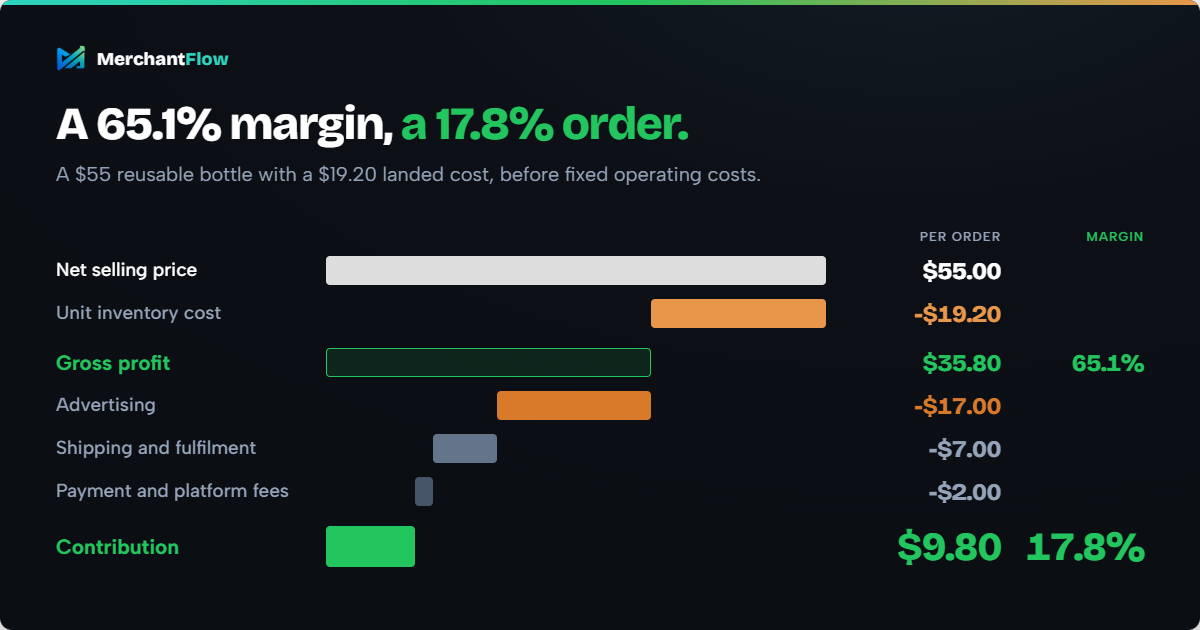
Suppose your Shopify store sells a reusable bottle for $55.
Its landed inventory cost is:
| Cost | Amount |
|---|---|
| Supplier cost | $16.00 |
| Allocated inbound freight | $2.00 |
| Duty and brokerage | $1.20 |
| Unit inventory cost | $19.20 |
At a $55 net selling price:
Gross profit = $55 - $19.20 = $35.80
Gross margin = $35.80 ÷ $55 = 65.1%
That sounds healthy.
But gross margin is not the end of the order economics.
Suppose the order also incurs:
- Advertising cost allocated to the sale: $17
- Outbound shipping and fulfilment: $7
- Payment and platform fees: $2
The contribution becomes:
$55 - $19.20 - $17 - $7 - $2 = $9.80
Contribution margin:
$9.80 ÷ $55 = 17.8%
A product with a 65.1% gross margin has become a 17.8% contribution-margin order before fixed operating costs.
MerchantFlow's Shopify Profit Margin Calculator can model these additional layers with your own numbers.
Why accurate COGS changes advertising decisions
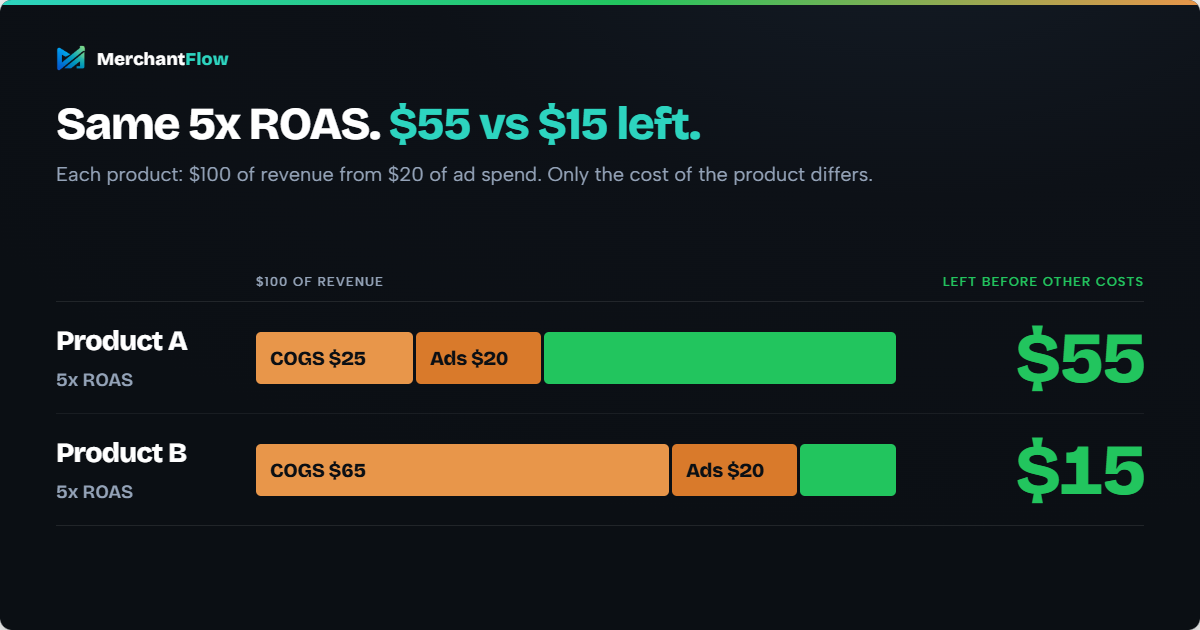
Consider two products that both generate $100 of revenue from $20 of ad spend.
Both show:
ROAS = $100 ÷ $20 = 5x
Now add COGS.
Product A
Revenue: $100
COGS: $25
Advertising: $20
Amount remaining before other costs:
$55
Product B
Revenue: $100
COGS: $65
Advertising: $20
Amount remaining before other costs:
$15
The ad platform sees 5x ROAS for both.
The business economics are completely different.
This is why product margins need to inform advertising decisions.
High ROAS does not automatically mean high profitability, especially when products have very different cost structures.
If you want to test this with a specific SKU, MerchantFlow's Product Profitability Calculator combines product cost with advertising, fees and refund assumptions.
How to keep Shopify COGS accurate as your store grows
For a small catalogue, maintaining COGS manually might be perfectly workable.
The process becomes harder once you have hundreds of variants, several suppliers and costs that change throughout the year.
A practical routine is:
- Assign a cost before a new SKU starts selling.
- Review supplier cost changes when new inventory is purchased.
- Calculate landed costs for material imports and shipments.
- Audit blank and zero-cost variants.
- Maintain historical cost changes where practical.
- Reconcile inventory and financial records regularly.
- Monitor the percentage of sales with reliable COGS attached.
- Review product profitability rather than relying only on store-wide margin.
The key metric is not simply "Do we have COGS?"
It is:
Can we trust the COGS attached to the products we are making decisions about?
COGS is the starting point, not the final profit number
Once your COGS is reliable, the next question becomes more useful:
How much money is left after the other costs required to generate and fulfil the sale?
A simplified ecommerce profit waterfall looks like this:
Gross sales
minus discounts and returns
= net sales
Net sales
minus COGS
= gross profit
Gross profit
minus fulfilment and shipping costs
minus payment fees
minus advertising spend
= contribution profit
Then operating expenses sit below that when calculating broader business profit.
This progression explains why looking at Shopify revenue, product cost and advertising platforms independently can create blind spots.
A product might rank first by revenue but much lower by contribution profit.
A campaign can report strong ROAS while sending customers to a low-margin product.
A discount can increase conversion while reducing the amount of profit generated per order.
The better question is not simply:
Which products are selling?
It is:
Which products are actually contributing profit after the costs required to sell them?
Track Shopify COGS alongside the rest of your profit
Reliable product costs are the foundation of useful ecommerce profitability reporting.
But manually combining Shopify orders, changing COGS, refunds, fulfilment, payment fees and advertising spend becomes difficult as a store grows.
MerchantFlow is built around connecting those layers.
Its Shopify integration brings Shopify order and product data together with COGS and other profitability inputs so products can be evaluated on profit rather than revenue alone. MerchantFlow's Shopify profit analytics can also help merchants bring product costs, missing COGS and cost history into the same profitability view.
You can start with the free COGS Calculator if you are still working out what your products cost.
Once those costs are reliable, the next step is seeing how much each product actually leaves behind after the rest of the costs required to sell it.
If spreadsheets are becoming the thing holding that analysis together, MerchantFlow gives you one place to see which Shopify products are actually making money after COGS, advertising and other costs.
Start a 14-day free trial and analyse your own Shopify profitability.
Frequently asked questions
Does Shopify calculate COGS automatically?
Shopify can calculate and report product costs, gross profit and gross margin using the Cost per item stored against products and variants. It does not automatically know a missing product cost, so the accuracy and completeness of the reporting depend on the cost data you maintain. Shopify states that product profit is reported only where cost information existed when the product or variant was sold.
Where do I find COGS in Shopify?
Go to Analytics > Reports in Shopify Admin and filter reports using the Profit Margin category. Shopify also provides finance reporting that separates net sales with recorded cost from net sales where cost was missing.
Does COGS include shipping?
It depends which shipping cost you mean. Inbound freight used to acquire inventory can form part of inventory cost. Shipping an order from your warehouse to the customer is normally better tracked separately as fulfilment or delivery cost when analysing ecommerce profitability. Accounting treatment should be confirmed for your business and jurisdiction.
What is the difference between landed cost and COGS?
Landed cost is the cost of acquiring inventory and getting it into saleable condition. COGS is the portion of inventory cost associated with products sold during a particular period. Landed unit cost can therefore form part of the cost basis used when calculating COGS, but the two terms are not technically identical.
Why are products missing from my Shopify profit report?
One common reason is missing cost information. Shopify says its product and variant profit reports only consider products that had Cost per item information recorded when they were sold.
What is a good COGS percentage for a Shopify store?
There is no universal target. A viable COGS percentage depends on product category, pricing, fulfilment costs, customer acquisition costs, returns and operating expenses. Instead of optimising COGS percentage in isolation, calculate whether enough gross margin remains to cover the other costs required to acquire and serve the customer.

About the author
Georgia CarapetisGeorgia Carapetis is Head of Marketing at MerchantFlow, helping ecommerce brands stop obsessing over ROAS and start focusing on profit. She writes about Google Shopping, contribution margins, and scaling without shrinking your margins.