Build Shopify dashboards with Claude, ChatGPT and Codex
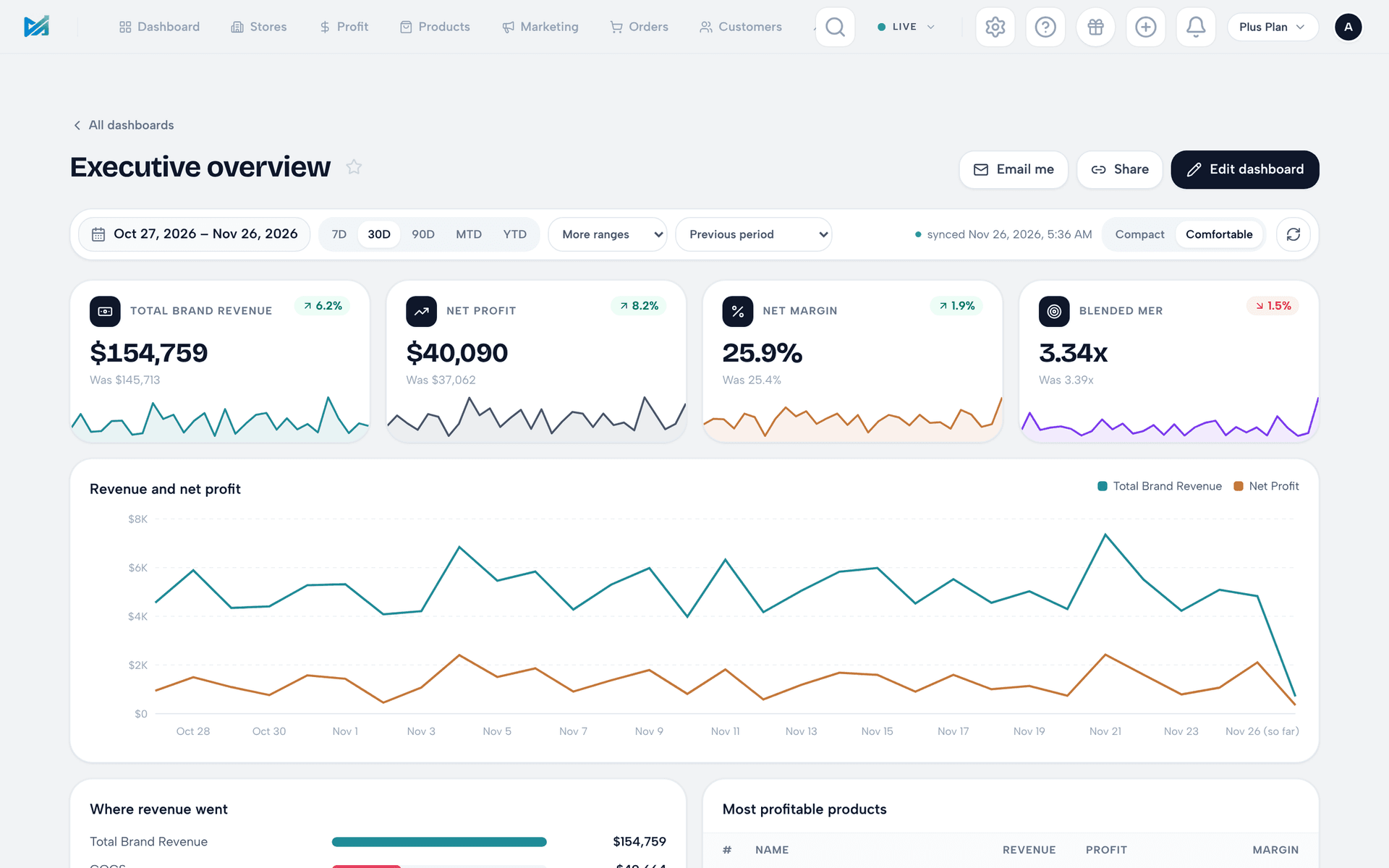
Describe the dashboard you want in one sentence. Your AI assistant builds it in MerchantFlow in seconds, with live net profit, ad spend, product and country figures, and it stays saved for your team. Want to tweak it? Drag, resize and add widgets yourself, or just keep asking.
Last updated
The AI connection is included on every MerchantFlow plan.
How it works
From one sentence to a live dashboard
1
Connect once
Add MerchantFlow to Claude, ChatGPT, Codex or Cursor with one URL and sign in. Reading your figures is allowed by default; building and editing dashboards is a separate permission you approve.
2
Describe it
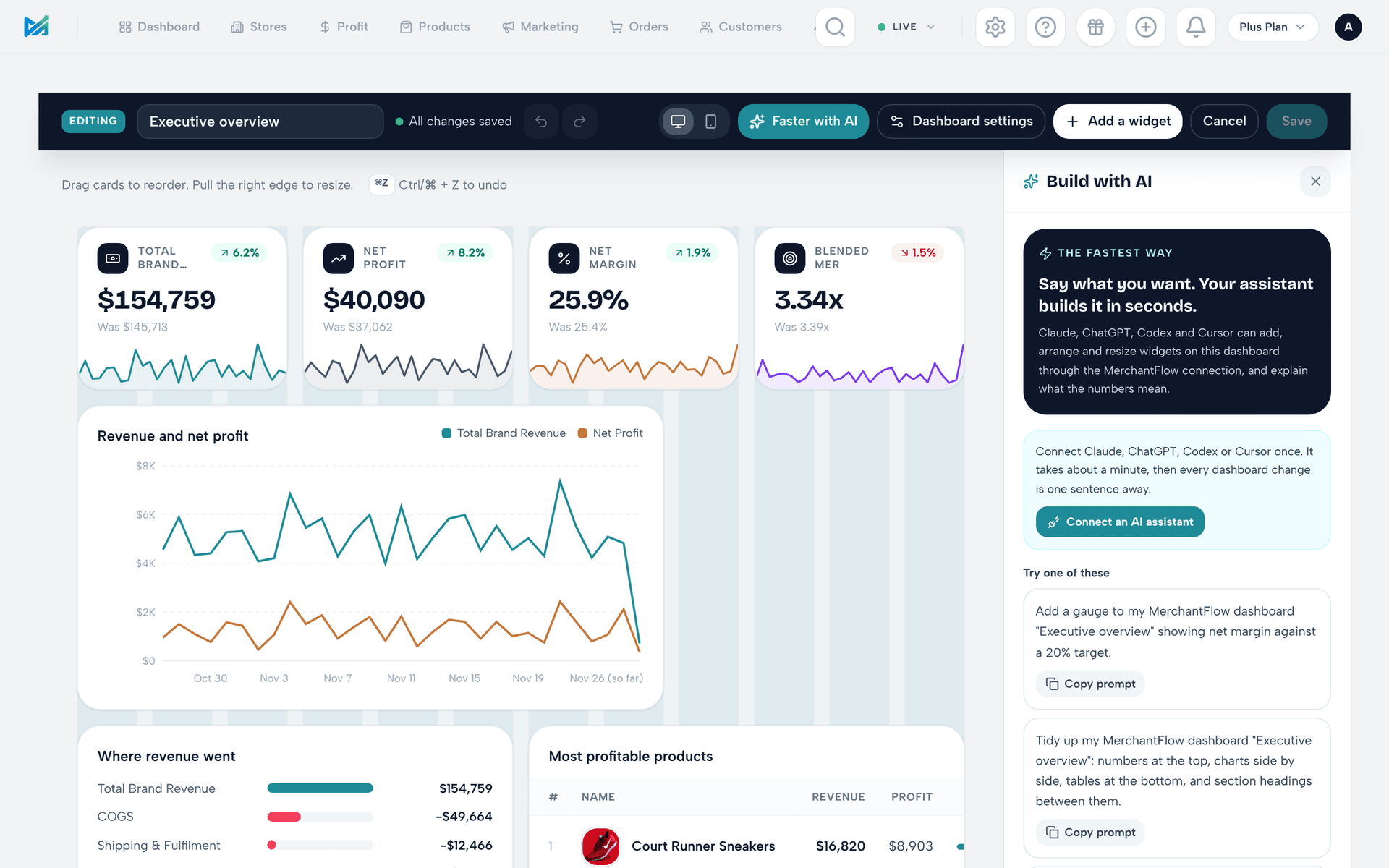
Say what you want to watch: "net profit, ad spend and MER for the last 30 days, a daily profit chart and my 10 most profitable products". Your assistant picks the widgets and the layout.
3
It is saved and live
The dashboard appears in MerchantFlow under Custom dashboards, recalculated from your latest synced data every time anyone opens it. Edit it by drag and drop, share a read-only link, or ask for changes.
Try it
Prompts that build real dashboards
Copy one into your assistant once MerchantFlow is connected. Each becomes a saved dashboard you can open, edit and share.
 Message to your AI assistant
Build me a MerchantFlow dashboard called Daily pulse with net profit, revenue, ad spend and MER for the last 30 days compared with the previous period, a daily revenue and net profit chart, and my 10 most profitable products.
- Works in Claude, ChatGPT, Codex and Cursor
- Saved in MerchantFlow
Message to your AI assistantCreate an Advertising dashboard in MerchantFlow for this month: ad spend, ROAS and MER cards, a breakdown of spend by ad platform, blended MER against a 3x target as a gauge, and a weekly chart of ad spend against net profit.
Message to your AI assistantMake a Markets dashboard in MerchantFlow ranking countries by net profit for the last 90 days, with a P&L waterfall and net margin against a 15% target for the same period.
Message to your AI assistantAdd a heading called Products and a podium of my top 3 products by margin to my MerchantFlow dashboard Daily pulse, then move the KPI cards to the top.
Prefer to do it yourself?
A drag-and-drop editor for the last 10%
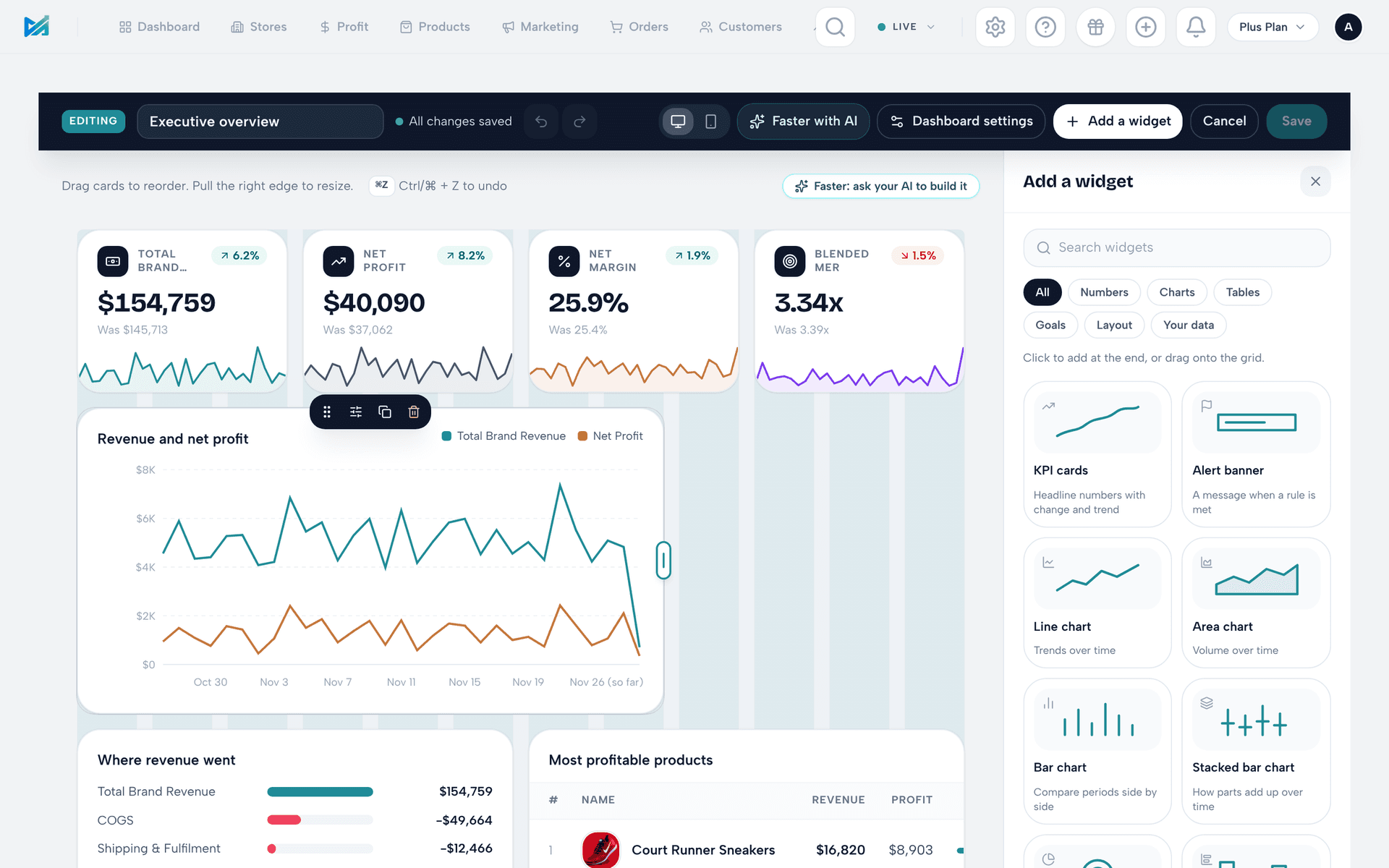
Every dashboard your assistant builds opens in the same editor you would use by hand. Drag cards to rearrange them, pull an edge to resize, add widgets from the library and see your real figures update before you save, with undo and a phone preview.
- 21 widget types: KPI cards with sparklines, line, area and bar charts, breakdowns, a P&L waterfall and statement, gauges, progress to target, product tables, podium, countries, alert banners and your own data
- 15 ready-made templates, from Executive overview to Black Friday
- Up to 24 widgets per dashboard, each with its own date range and comparison if you want
- A Faster with AI button in the editor with prompts written for the dashboard you are on
Your products, with their images
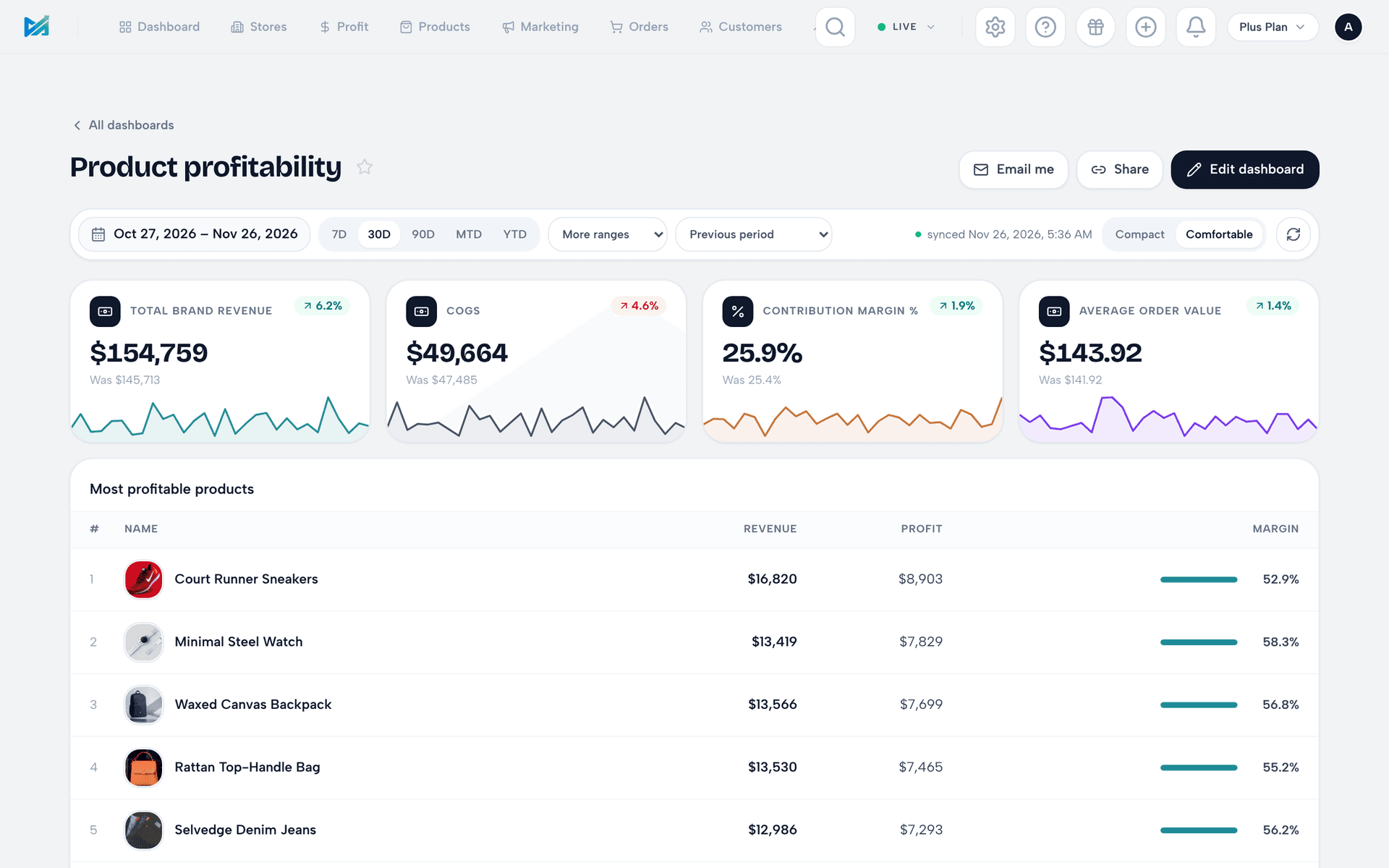
Product tables and the podium show each product's image from your store next to revenue, profit, margin and units, so a dashboard reads like your catalogue rather than a spreadsheet.
Why the numbers hold up
Your assistant arranges the dashboard. MerchantFlow does the maths.
A dashboard an AI writes from scratch has to guess how to treat refunds, taxes, discounts, product costs, shipping, payment fees and ad spend. Small guesses compound into a profit figure that is confidently wrong.
Here the assistant only chooses metrics and layout. Every figure comes from the same calculations as the rest of MerchantFlow, under your own accounting settings, and a metric that cannot be calculated shows as unavailable with the reason instead of a zero. When product costs are missing for some units sold, the dashboard says so and links to the fix.
Setup
Connect your assistant
Connect your store to MerchantFlow first, then add MerchantFlow to your assistant. Sign-in uses OAuth, so you never paste a password or API key into a chat.
MerchantFlow connector URLhttps://merchantflow.ai/api/mcp
Claude
In Claude, open Settings, then Connectors, add a custom connector and paste the URL above. Approve the sign-in when Claude asks.
Claude Code
Run this in your terminal, then start Claude Code and approve the sign-in.
claude mcp add --transport http merchantflow https://merchantflow.ai/api/mcp
ChatGPT
Add the MerchantFlow app in ChatGPT and sign in. Dashboards open right inside the chat.
Open in ChatGPTCodex
Add MerchantFlow as a remote MCP server, then sign in. See OpenAI's Codex MCP guide for the details.
codex mcp add merchantflow --url https://merchantflow.ai/api/mcp
codex mcp login merchantflowBuilding and editing dashboards needs the dashboards write permission, which your assistant asks you to approve the first time. It can change dashboards and their settings only, never your store, orders, products or ad accounts.
Under the hood
What your assistant can do with dashboards
These are the MerchantFlow tools your assistant calls. Each one checks your role and plan, exactly as the dashboard itself does.
- Start from a template or a blank dashboard, and duplicate one
- Add, update, move, resize and remove widgets
- Change the default date range and comparison
- Save your own formulas, like net profit per order, and chart them
- Open a dashboard with its figures, inline in the chat
- Create a read-only share link with an expiry
list_dashboard_templatescreate_dashboardupdate_dashboardget_dashboardlist_dashboardsduplicate_dashboardshare_dashboardquery_metricssave_custom_metric
Questions
Can Claude build a Shopify dashboard?
Yes. Connect MerchantFlow to Claude, then describe the dashboard you want. Claude builds it with MerchantFlow's dashboard tools and it is saved in your MerchantFlow account, where your team can open, edit and share it.
Does it work with ChatGPT and Codex too?
Yes. Any assistant that supports MCP can connect, including Claude, Claude Code, ChatGPT, Codex and Cursor. They all edit the same saved dashboards.
Is this faster than building a dashboard by hand?
Usually. One sentence can add a full set of KPI cards, charts and tables in the right order, which would take dozens of clicks. The editor is there for the final touches.
Where do the numbers come from?
From MerchantFlow's own calculations over your synced store, ad and cost data, the same figures as the rest of the app. The assistant chooses what to show, not how it is calculated.
Can my assistant change my store or my ad accounts?
No. The dashboards permission lets it create and edit dashboards and their settings in MerchantFlow. It cannot change your store, orders, products or ad accounts.
Does it work with WooCommerce?
Yes. Dashboards work the same for Shopify and WooCommerce stores, and for stores with both.
Can I share a dashboard with someone who does not use MerchantFlow?
Yes. Create a read-only link from the dashboard or ask your assistant to. You choose when it expires, can add a password, and can revoke it at any time.
Ask for the dashboard you have always wanted
Connect your store, connect your assistant, and describe it.